Introduction
Most manufacturers don't discover quality problems when they happen. They discover them when a batch gets rejected, a customer calls to complain, or an auditor flags a non-conformance. By then, the scrap is already made and the damage is done.
ERP and MES systems promise real-time production visibility. The reality on most shop floors looks different: clipboards, spreadsheets, verbal handoffs between shifts, and quality data that lags hours behind actual production.
According to the Manufacturing Leadership Council, 70% of manufacturers still collect data manually — meaning most quality tracking systems are built on a foundation that almost guarantees delayed detection.
This article covers which quality tracking tasks to automate first, what to look for in a system, and how to roll out automation without disrupting active production.
Key Takeaways
- Automation closes the gap between defect occurrence and detection that manual tracking cannot — in real time
- Target high-frequency, rule-based tasks first: inspection logging, defect escalation, shift reporting, and compliance docs
- Effective quality automation depends on machine data, operator activity, and ERP workflows unified in one system
- Phase your rollout: start with the highest-defect production line, prove results, then expand
The Hidden Cost of Manual Quality Tracking
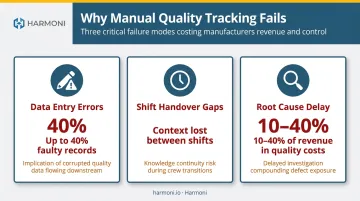
Manual quality tracking fails in three distinct ways. Each one creates problems on its own — but in most shops, all three operate simultaneously.
Failure Mode 1: Data entry errors that corrupt quality metrics. When operators record inspection results on paper or in spreadsheets, errors accumulate. A study from Quality Magazine found that two-step paper calibration processes can produce faulty records in up to 40% of entries. When quality metrics are built on distorted inputs, trend analysis is unreliable and root cause investigations start from the wrong baseline.
Failure Mode 2: Shift handover gaps. Quality context is routinely lost between shifts. An outgoing operator knows a machine has been drifting, but if that context lives in a verbal briefing or a handwritten note, the incoming team may not act on it — or may not receive it at all. By the time the next shift confirms a defect, the window for early correction has already closed.
Failure Mode 3: Inability to trace defects to root cause. Without automated timestamps and process context, answering "when did this start and why?" can take hours of manual investigation. That delay has real cost: Aberdeen's research puts quality-related costs at 10–15% of revenue for well-managed manufacturers — and up to 40% for others.
The Compliance Dimension
For manufacturers in aerospace, defense, and medical device production, manual tracking creates a distinct category of risk: compliance exposure. The FDA's updated Quality Management System Regulation (QMSR), effective February 2026, estimates nearly 10 million annual recordkeeping hours across the medical device industry. Defense contractors face similar burdens under CMMC and DFARS requirements.
Paper-based systems weren't designed for this volume of recordkeeping. As manufacturers add shifts, product lines, and machines, the gaps in manual tracking widen — and the compliance exposure grows with them.
What Automating Quality Tracking Actually Means
Automation doesn't replace quality engineers or inspectors. It removes the manual steps that delay, distort, or bury quality data before anyone can act on it. Two levels are worth distinguishing:
- Task-level automation — logging an inspection result automatically when a measurement is taken
- Process-level automation — triggering a corrective action workflow when a threshold is crossed
Both matter — task-level automation improves data accuracy and speed, while process-level automation closes the loop and turns data into action.
The Four Quality Control Categories
ASQ defines four cost-of-quality categories, and automation applies differently to each:
| Category | Definition | How Automation Helps |
|---|---|---|
| Prevention | Stopping defects before they occur | Automated SOP delivery, revision control at the machine |
| Appraisal | Inspecting during or after production | Digital checksheets, connected gauges, real-time SPC |
| Internal Failure | Defects caught before customer delivery | Threshold alerts, automated escalation, scrap logging |
| External Failure | Defects that reach the customer | Traceability records, audit trails, job history exports |
Monitoring vs. Tracking vs. Tracing
These three terms are often used interchangeably, but they're distinct:
- Quality monitoring — watching live process data (defect rates, out-of-tolerance signals in real time)
- Quality tracking — recording what happened, when, and under what conditions
- Quality tracing — following a component's full path from raw material to finished product
Each depends on automation to work well. Most manual systems attempt tracking but fall short on monitoring and tracing — meaning data gets recorded but never watched in real time or traced back through the production chain.
Quality Tracking Tasks Worth Automating First
Not every quality task is worth automating immediately. The prioritization principle is straightforward: focus on tasks that are high-frequency, rule-based, and currently causing the most lag or data errors.
Juran's Pareto research gives a useful manufacturing example: in a 25-step production process, just 5 operations can account for 65% of total scrap. A similar concentration applies to data errors and reporting delays. The tasks most worth targeting first share three traits:
- High repetition (performed every shift, every job, or every part)
- Rule-based logic (results either pass or fail a defined threshold)
- Measurable downstream impact (errors here cause scrap, rework, or audit failures)
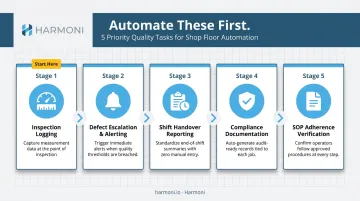
Repetitive Inspection Logging
Manually recording dimensional checks, visual inspections, and first article verifications is time-consuming and error-prone. Automated capture via connected gauges, digital checksheets, or Bluetooth measuring tools ensures results are timestamped, standardized, and immediately visible to supervisors — without operator re-entry.
Harmoni's platform supports Bluetooth-connected measurement tool integration, capturing results directly into the system the moment a measurement is taken.
Defect Escalation and Alerting
When a defect rate crosses a threshold, someone needs to know immediately — not at the end of shift. Automated alerting removes the dependency on an operator noticing and manually reporting.
Effective escalation routes alerts based on predefined rules: a dimensional issue goes to the quality engineer, a machine fault goes to maintenance, a job falling behind goes to the supervisor. That routing should reflect your plant's actual org structure — not a generic alarm broadcast sent to everyone.
Shift Handover Reporting
Shift handovers are one of the most common points where quality context disappears. Automating the shift summary — capturing defect counts, machine status, open issues, and operator activity from the live system — gives the incoming team accurate context rather than a verbal briefing that varies by person and mood.
Compliance Documentation and Audit Trails
In aerospace, defense, and medical device manufacturing, every inspection and corrective action must be documented and traceable. Automated logging creates timestamped records without requiring operators to fill out separate compliance forms.
Harmoni's platform creates auditable digital quality records per job — supporting AS9100, ISO 13485, IATF 16949, and ISO 9001 compliance — and includes multi-factor authentication and access logging for CMMC and ITAR-aligned environments.
SOP Adherence Verification
Automated work instruction delivery ensures operators see the correct SOP for each job at the workcenter — not a printed revision from last quarter. Harmoni links work instructions to the specific job and part revision, then delivers them automatically to the workcenter when the job is detected via RFID — eliminating manual document retrieval and revision mix-ups.
These five task types — inspection logging, escalation, shift handover, compliance records, and SOP delivery — cover the majority of quality data failures in most shops. Automating them first builds the foundation for more advanced quality analytics downstream.
Key Capabilities of an Automated Quality Tracking System
Not all quality tools are built the same. The critical differentiator is whether a system can pull data from machines, operators, and ERP — and present it in a unified view. A system that logs data without contextualizing it against job requirements and machine state still leaves quality managers reactive.
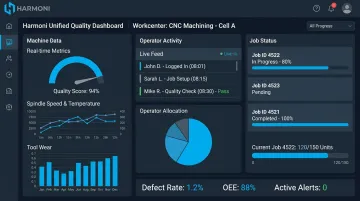
Real-Time Dashboards with Unified Data
A useful quality dashboard surfaces defect rates by job, machine, operator, and shift simultaneously. Single-dimension views — defects by machine alone, or by shift alone — miss the intersections where real patterns emerge.
Harmoni's factory orchestration platform brings machine data, ERP job data, and operator activity together in a single view. The result is operational context, not isolated data points — so a quality manager can see not just that a defect rate is rising, but which job, on which machine, during which operator's run.
Automated Data Capture at the Workcenter
Capturing quality data at the point of work — rather than relying on self-reporting to a separate system later — is foundational. Technologies like RFID-based operator detection automatically associate an operator with a specific job and machine, eliminating manual log-ins and ensuring data accuracy without adding steps to the operator's workflow.
That accuracy compounds fast. At WessDel, a San Jose-based aerospace and defense component manufacturer, a process that previously took 11 minutes per ERP transaction was reduced to seconds after implementing Harmoni — recovering 17 productive hours per employee per month and delivering a 5x return on ongoing platform costs.
ERP and MES Integration
Quality data only becomes actionable when connected to job data in ERP — which job is running, what the specs are, which customer it's for. Look for systems that integrate bidirectionally: quality failures should automatically update job status and trigger downstream workflows in the ERP. Harmoni natively integrates with Epicor, Infor, Infor Visual, ECI JobBoss, ABAS, and ODOO — with custom integrations available for legacy systems.
Traceability and Reporting for Audits
Audit prep should be a data export, not a days-long document-gathering exercise. A complete traceable record includes:
- Every inspection result, tied to the job and operator
- Timestamped production events and machine state changes
- Operator actions logged automatically — no manual entry required
- On-demand export for customer audits or regulatory inspections
How to Implement Automated Quality Tracking Step by Step
The "boil the ocean" approach — automating every quality task across every line at once — reliably produces poor adoption and hard-to-measure ROI. A phased, high-impact-first approach delivers faster wins and builds confidence in the system.
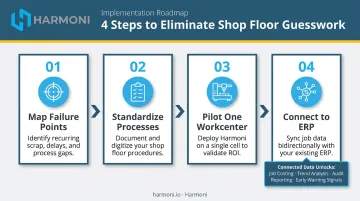
Step 1: Map Your Highest-Risk Quality Failure Points
Start by identifying where quality failures are currently most costly. Highest scrap rates, most frequent rework, most common audit non-conformances — these are the first candidates for automation because the ROI is clearest and the urgency is highest.
Don't start with the easiest line. Start with the most painful one.
Step 2: Standardize Before You Automate
Automating an inconsistent process speeds up the inconsistency. Before automating a quality check or escalation workflow, the process needs to be defined, documented, and stable. Quality tasks that vary by operator or shift need to be standardized first — otherwise automation locks in the wrong behavior.
Step 3: Pilot One Workcenter or Production Line
Pilot on one workcenter before expanding — ideally one with high defect history and operators willing to engage with new tools. Harmoni deploys in weeks rather than months, which allows manufacturers to test, measure, and refine before committing to a broader rollout.
At WessDel, the initial installation was complete in under one week. Operators were live on the system the same day and delivered measurable efficiency improvements immediately.
Measure the pilot against clear KPIs:
- Defect detection time (before vs. after)
- Scrap rate at the workcenter
- Reporting accuracy (completeness of digital vs. paper records)
- Time spent on quality documentation per shift
Step 4: Connect to ERP for Full Operational Context
Once the pilot proves out, connecting quality tracking data to your ERP environment is what turns isolated results into shop-wide intelligence. Each additional line brought online adds data density — and with it, a clearer operational picture.
That shift matters because quality tracking stops being purely descriptive (recording what happened) and becomes predictive, enabling intervention before the next defect occurs. Connected data enables:
- More accurate job costing tied to real scrap and rework events
- Trend analysis across lines, shifts, and part families
- Reliable customer and audit reporting without manual data assembly
- Early warning signals that flag repeat failure patterns before they escalate
Frequently Asked Questions
What is the 80/20 rule for automation in manufacturing?
In manufacturing quality, roughly 20% of tasks — typically the most repetitive and rule-based, like inspection logging and defect escalation — account for 80% of manual data errors and reporting delays. Juran's research confirms this pattern: in one example, 5 of 25 process steps produced 65% of all scrap. Focusing automation on this high-impact minority delivers the greatest quality improvement with the least disruption.
What are the four types of quality control in manufacturing?
The four categories are prevention control (stopping defects before they occur), appraisal control (inspecting during or after production), internal failure control (addressing defects caught before delivery), and external failure control (managing defects that reach the customer). Automation accelerates response across all four, from SOP enforcement at prevention to traceable audit records for external failures.
What is the best software for quality control in manufacturing?
The right system depends on your ERP, machine types, and compliance obligations. Prioritize a platform that integrates with existing systems, automates data capture at the workcenter, and delivers real-time dashboards. Factory orchestration platforms like Harmoni bridge the gap between quality software and actual shop floor execution.
What is the difference between quality monitoring and quality tracking?
Quality monitoring refers to watching live process data — defect rates, machine output, and out-of-tolerance signals in real time. Quality tracking records the history of what happened, when, and under what conditions. Both are essential, and they work best when unified in the same system rather than managed through separate tools.
How long does it take to implement automated quality tracking?
A phased approach starting with one workcenter can deliver measurable results within weeks. Harmoni, for example, integrates with existing ERP systems and CNC machines without replacement and can have digital quality checksheets operational at a single workcenter in under a week. The most common delay factor is organizational readiness, not the technology.