According to research cited in a Siemens Digital Industries webinar, 61% of machine shops still rely on paper for data transfer between planning and the shop floor. That means most manufacturers are discovering problems after the damage is done — a scrapped batch, a missed delivery commitment, a job that cost twice what it was quoted.
CNC machine data collection (MDC) changes that equation. This guide covers what MDC actually captures, which collection methods work for modern and legacy equipment, why raw machine signals aren't enough on their own, and what it takes to connect all of it into decisions that improve throughput and reduce costs.
Key Takeaways
- CNC MDC automatically captures machine status, spindle data, cycle times, alarms, and part counts directly from the controller — no manual entry required.
- Modern CNCs connect via MTConnect, OPC-UA, or manufacturer APIs (Fanuc FOCAS, Haas Q-commands); older machines require edge devices or analog signal capture.
- The most useful metrics are OEE, spindle utilization, cycle time variance, and scrap rate — tracked in real time, not reviewed weekly.
- Raw machine data only tells part of the story — real operational visibility requires layering in job identity, operator context, and ERP schedule data to act on what the machines are reporting.
- Shops that connect machine signals to ERP and operator activity move from reactive reporting to proactive decisions that reduce downtime, scrap, and missed delivery dates.
What Is CNC Machine Data Collection?
CNC machine data collection is the automated, continuous capture of operational signals generated by CNC controllers during production. It includes machine status, process parameters, part counts, alarm codes, and condition data — timestamped at the source and fed into a system where engineers and managers can analyze and act on it immediately.
The contrast with manual reporting matters. Paper logs and end-of-shift entries are:
- Delayed — entries written hours after the fact, not at the moment of occurrence
- Inconsistent — quality depends entirely on who's filling them out
- Incomplete — state changes get missed, compressed, or reconstructed from memory
MDC captures every state change when it happens. No reconstruction. No gaps.
That difference drives a fundamental shift from reactive to proactive manufacturing. With manual systems, you find out a job ran long when the shift report lands on your desk. MDC tells you cycle time is drifting while the machine is still running — so you can do something about it.
What Data Do CNC Machines Generate?
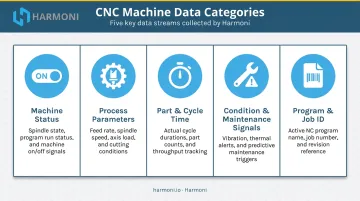
Modern CNC controllers continuously produce several categories of operational data. Understanding each category helps prioritize what to collect and why.
Machine Status Data
Status signals tell you whether the machine is running (in-cycle), idle, in feed hold, alarmed, or powered off. This is the foundation for calculating availability and identifying unplanned downtime. Every idle minute has a cause: operator absence, material wait, setup, or equipment fault. Status data is how you find it.
Process Parameter Data
Process parameters include:
- Spindle speed and feed rate
- Axis load and coolant status
- Active tool number
These values reveal whether a job is running at programmed conditions or whether an operator has manually overridden feeds and speeds. Research published in PMC using MTConnect data confirms that a feed override below 100% indicates the operator is slowing the machine, increasing cycle time either to avoid chatter or for other reasons.
Tracking this systematically surfaces both quality risks and efficiency losses.
Part and Cycle Time Data
Cycle time data captures the elapsed time from program start to M30 (cycle complete), parts produced per hour, and cumulative part counts. Comparing actual cycle times to estimated cycle times is one of the fastest ways to surface inefficiency — and it's essential for accurate job costing.
Condition and Maintenance Signals
Condition data includes spindle load trends, power consumption, and alarm codes. Tracking these over time builds the historical baseline needed for predictive maintenance. Early signs of tool wear, spindle degradation, or coolant problems become visible before they produce a scrapped part or an unplanned stoppage.
Program and Job Identification Data
The controller can report which CNC program is active, its name or number, and macro variable values. On its own, this only tells you what program is running — not which work order, which customer, or which revision it belongs to. That gap matters, and it's addressed in the next section.
How to Collect Data from CNC Machines
There is no single universal method. The right approach depends on the controller brand and age, the shop's IT infrastructure, and how data needs to flow into downstream systems.
Native Controller Protocols (Modern CNCs)
Three protocols cover most modern CNC environments:
- MTConnect — an open, royalty-free standard that delivers structured XML data over HTTP. MTConnect is now deployed on more than 250,000 devices in over 50 countries and is supported natively by Haas (NGC software 100.20.000.1200 or higher), Mazak Smooth, and others. It's read-only by design, which simplifies security.
- OPC-UA — a platform-independent, secure protocol developed through a joint working group of the OPC Foundation and VDW. Participating manufacturers include Siemens, DMG MORI, Heidenhain, Trumpf, and Chiron. Siemens SINUMERIK 840D sl and 828D support OPC-UA natively through Access MyMachine.
- Fanuc FOCAS — a Fanuc-native library that provides deep access to axis data, cycle time, part counts, alarms, servo data, and macro variables via Ethernet or HSSB. FOCAS2 supports current and legacy Fanuc CNCs with either connection type.
Edge Devices and Adapters for Legacy Machines
Older machines without Ethernet connectivity cannot natively export data via modern protocols. Hardware-based capture solves this by tapping into the machine's I/O, spindle drive, relay outputs, or power lines to translate analog signals into digital data streams.
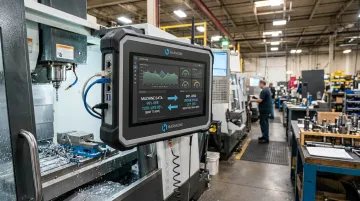
Harmoni's platform handles this without requiring separate edge devices or external gateways. Each Harmoni terminal has built-in connectors supporting RS-232, Ethernet, USB, CAN bus, and 1-wire interfaces. For machines with no protocol support at all, the terminal includes five analog inputs and current sensors wired to the same lines powering the machine's indicator lights — mapping those signals directly to operational states with no machine replacement required.
Connecting to Business Systems
Collected machine data needs to flow somewhere useful. This typically requires a middleware or integration layer that speaks the CNC protocol on one side and pushes structured data to dashboards, MES systems, or ERP platforms on the other.
Harmoni's terminal includes a built-in OPC-UA server and MTConnect driver, eliminating separate integration projects per machine type. Native machine compatibility covers:
- Mazak, Haas, Fanuc (0i, 30i, 31i, 32i), Heidenhain, Siemens/Sinumerik
- DMG MORI, Makino, and Fadal
On the ERP side, native integrations cover Epicor, Infor, Infor Visual, JobBoss/JobBoss2, ABAS, and ODOO. The data flow runs bi-directionally — machine data surfaces in the ERP, and ERP job data flows back to the shop floor — combining machine output, operator activity, and ERP workflows in a single unified view.
Why Machine Data Alone Doesn't Tell the Full Story
A dashboard showing spindle utilization at 85% looks healthy. It isn't always. That number doesn't tell you whether the right job is running, whether the operator is on the correct program revision, or whether the machine is contributing to a delivery commitment that's already at risk.
Raw machine data tells you the spindle is turning. It doesn't tell you why, for whom, or whether it should be.
The Missing Context: Operator and Job Data
Connecting machine signals to a specific work order, operator identity, and job routing instruction is what transforms data into accountability. A machine running a low-priority job while a hot order waits creates a real problem that's invisible unless the system knows both what the machine is doing and what it's supposed to be doing.
Harmoni's RFID-based detection handles this automatically. The terminal reads RFID badges up to 15 feet away, identifying the operator as they approach. Job paperwork tagged with inexpensive RFID stickers triggers automatic job detection simultaneously, linking the operator, the work order, and the machine state in a single event.
The system also automatically loads the correct CNC program for the detected part revision — preventing wrong-program errors before they start.
The ERP Gap
ERP systems hold the schedule, the job costing targets, and the delivery commitments. They have no visibility into what's actually happening on the floor. Machine data collection closes that gap.
Harmoni pushes actual cycle times, labor records, part counts, and scrap data back into the ERP automatically — eliminating manual entry and the reconciliation that follows it. One customer described the problem before implementation: there was a significant gap between what the shop floor was actually doing and what Epicor reflected based on time charging activity, and that gap was driving every management decision from scheduling to quoting.
With Harmoni's bi-directional ERP integration, job costing records reflect what jobs actually cost — not what they were estimated at when the job was quoted.
Combining All Three Data Streams in Real Time
Harmoni's factory orchestration platform sits between ERP systems, MES systems, machines, and operators to combine all three data streams in real time: machine signals, operator activity (including RFID-detected job and employee events), and ERP workflow data. Shop floor dashboards and andon-style OEE indicator lights surface that unified view visually — showing color-coded machine performance status on the floor and detailed metrics through the web portal for management.
That unified view identifies problems while they're happening — when corrective action is still possible, not after the shift ends.
Key CNC Metrics to Track for Data-Driven Manufacturing
Not all data points carry equal weight. Start with a focused set of metrics that connect directly to production performance, equipment health, and cost.
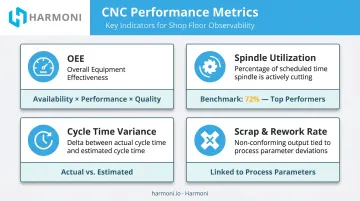
| Metric | What It Measures | Why It Matters |
|---|---|---|
| OEE | Availability × Performance × Quality | Single number summarizing productive machine use |
| Spindle Utilization | % of scheduled time the spindle is actually cutting | Top-performing shops hit 72% spindle utilization; most fall well short |
| Cycle Time Variance | Actual vs. estimated cycle time per job | Surfaces process drift and quoting accuracy issues |
| Scrap & Rework Rate | Defects per job tied to machine data | Connects process parameters to quality outcomes |
85% OEE is considered world class for discrete manufacturers; 60% is fairly typical. That 25-point gap represents recoverable capacity most shops never see — because they're not measuring it.
The metrics that matter most are those you can act on while production is still running. A weekly OEE report describes what already happened. Real-time visibility lets you respond before a bad shift compounds into a bad week.
Harmoni uses the cycle time estimate defined in your ERP as the performance baseline — defining 100% performance as matching the time the job was originally quoted at. That framing makes cycle time variance immediately actionable for both production managers and the estimating team.
Benefits of CNC Machine Data Collection
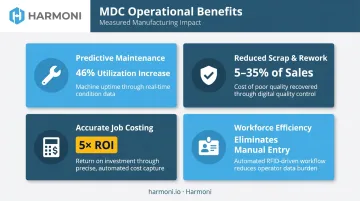
MDC delivers measurable impact across four operational areas:
Predictive maintenance: Spindle load trends and alarm code history surface early warning signs before they become unplanned downtime. Custom alerts notify cell leads the moment a machine idles beyond a defined threshold. One shop reported a 46% increase in utilization on a five-axis machine after responding faster to downtime events with monitoring in place.
Reduced scrap and rework: Process parameter monitoring triggers immediate alerts when a machine drifts outside programmed conditions. The cost of poor quality in manufacturing ranges from 5% to 35% of sales dollars — catching drift early is far cheaper than scrapping a batch.
Accurate job costing: When actual cycle times and machine utilization push automatically into the ERP, cost data reflects what jobs actually cost to produce. The WessDel case study showed Harmoni delivering over 5× its ongoing cost in documented operational benefit, driven largely by closing the gap between shop floor activity and ERP job records.
Workforce efficiency: Automatic data collection eliminates manual reporting from operators. RFID-based job detection and automated clock-in/out remove data entry errors and end-of-shift paperwork — giving operators more time at the machine and giving managers cleaner data without the chase.
Frequently Asked Questions
How do you get data from a CNC machine?
Modern CNC machines expose data through MTConnect, OPC-UA, or manufacturer-specific APIs like Fanuc FOCAS or Haas Q-commands over Ethernet. Legacy machines can be connected using edge devices or analog current sensors that capture machine state from drive signals or power lines and convert it to digital data streams.
What coding language do CNC machines use?
CNC machines use G-code (RS-274) as their primary programming language, with standardized commands controlling movement, spindle speed, feed rate, and tool changes. Manufacturers like Siemens (Sinumerik) and Mazak (MAZATROL) have their own dialect variants, but the core G-code structure is consistent across most controllers.
What types of data can be collected from CNC machines?
The main categories are machine status (running, idle, alarm), process parameters (spindle speed, feed rate, tool in use), part and cycle time data (cycle duration, M30 part counts), condition signals (spindle load, alarm codes), and program identification data (active program name or number).
What is the difference between real-time and batch CNC data collection?
Real-time collection continuously transmits machine data as it is generated, enabling live dashboards and immediate alerts. Batch collection gathers data at set intervals for historical reporting. Real-time collection is preferred for detecting and responding to problems while they are occurring, not after the shift ends.
How does CNC machine data collection improve OEE?
MDC feeds all three OEE components: availability tracking through automatic downtime logging, performance measurement by comparing actual cycle times to standards, and quality support by flagging process deviations tied to defect rates. Without it, OEE calculations rely on estimates and operator recall, which rarely hold up at the job level.