Introduction
Most mid-to-large manufacturers are operating with a version of the same problem: paper travelers on the floor, ERP data that's hours behind actual production, and machines running in isolation with no connection to the jobs they're cutting. The cost of this gap shows up as scrap from outdated programs, idle operators waiting for direction, and shift-end scrap reports that caught everyone off guard — despite being preventable all day.
According to the Manufacturing Leadership Council, 70% of manufacturers still enter data manually — and only 56% collect at least half of their manufacturing data in real time. That's a lot of decisions being made on yesterday's information.
A modern digital shopfloor solution closes this gap by coordinating operators, CNC machines, job travelers, and ERP transactions in real time. This post covers the 10 features every capable solution must have — and what each one actually delivers on the floor.
Key Takeaways
- 70% of manufacturers still rely on manual data entry, creating costly visibility gaps across production
- The 10 key features cover real-time dashboards, machine connectivity, ERP integration, operator guidance, and automated reporting
- The best solutions connect your ERP, machines, and operators into one system that drives execution, not just visibility
- Evaluate vendors on integration depth, deployment speed, and measurable operational outcomes
What Is a Modern Digital Shopfloor Solution?
A digital shopfloor solution is software — and associated hardware interfaces — that connects machines, operators, and enterprise systems to give manufacturers real-time control and visibility over production operations.
That sounds similar to a traditional MES, but the distinction matters. A traditional MES focuses on scheduling, work order execution, and data collection. A modern digital shopfloor solution goes further, acting as an orchestration layer that actively coordinates people, systems, and machines to improve how work gets executed, not just tracked.
In the manufacturing stack, it sits:
- Above machines, PLCs, and CNC controls
- Below or alongside ERP systems
- In direct interaction with operators at each workcenter
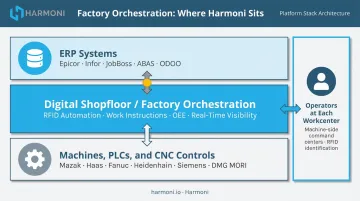
Harmoni, for example, describes this as factory orchestration — a category distinct from machine monitoring or MES, focused on coordinating people, machines, systems, and engineering requirements in real time. The platform doesn't replace ERP or MES; it makes them execute better in real-world manufacturing conditions.
As production complexity grows — tighter tolerances, labor shortages, compliance requirements — the specific features a solution offers become the difference between a system that reports problems and one that prevents them.
Top 10 Features of a Modern Digital Shopfloor Solution
These features represent the functional pillars that separate a capable digital shopfloor solution from a basic monitoring tool.
Feature 1: Real-Time Production Visibility Dashboard
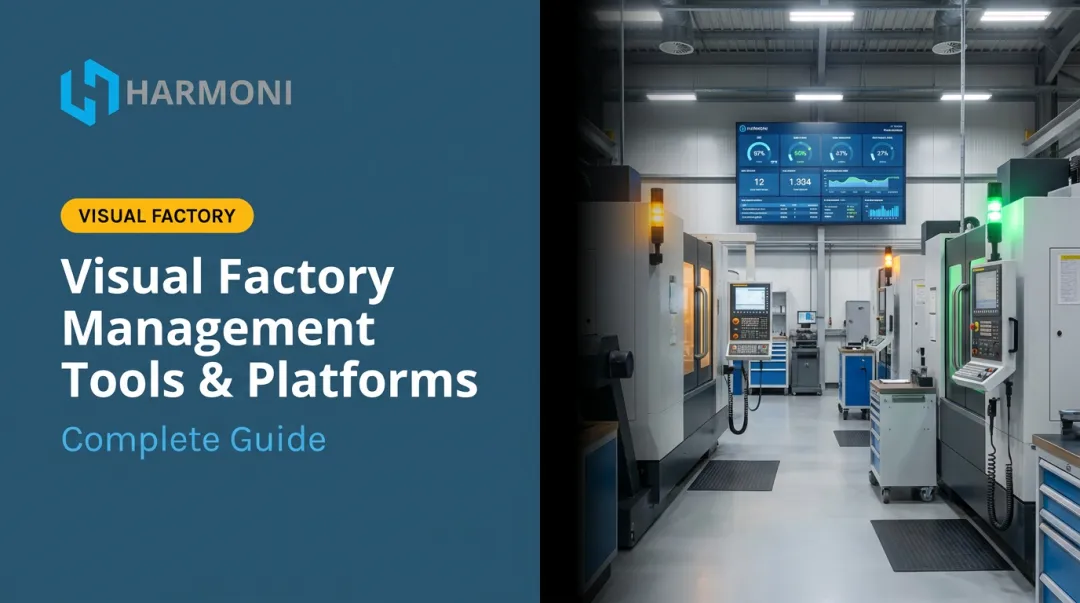
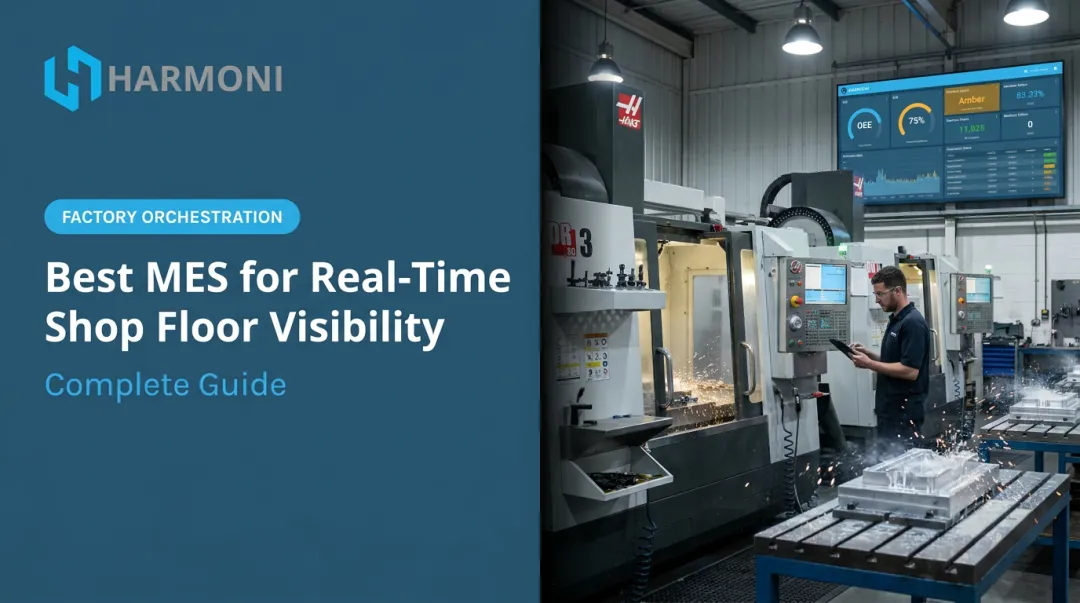
A unified dashboard consolidating machine status, job progress, and operator activity in real time is the foundation of shopfloor intelligence.
Visibility gaps force reactive decision-making. By the time a supervisor notices a problem at shift-end review, hours of output are already lost. A good dashboard surfaces problems while they're happening — not after.
Harmoni's dashboards pull simultaneously from three data streams:
- Machine data — cycle times, downtime events, spindle state
- ERP data — job targets, work orders, costing benchmarks
- Operator activity — RFID-detected presence, labor clocking, quantity entries
The result is a unified operational view where managers can see every machine's status at a glance, operators track their performance against job targets right at the machine, and exception alerts route directly to supervisors. Maradyne Corporation documented it simply: "Now we know how many units we are producing each day, in real-time!"
Feature 2: Machine Data Connectivity (IIoT / MTConnect / OPC-UA)
The solution must connect to existing equipment — including older machines — using open protocols. Replacing machines to gain connectivity is not a realistic option for most mid-market manufacturers.
AMT reported that surveyed job shops had a median machine age of 7 years, with a median fleet of 16 CNC machines. Mixed-age, mixed-brand fleets are the norm, not the exception.
A capable solution handles this through:
- MTConnect (ANSI-accredited standard with vocabulary for CNCs, lathes, EDM, lasers, robots, and more)
- OPC-UA (machine-to-machine and machine-to-enterprise interoperability)
- Analog inputs and current sensors for machines too old for protocol-based connectivity
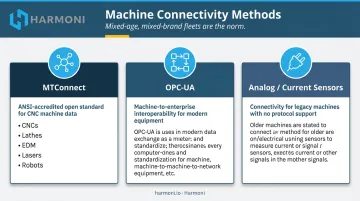
Harmoni natively supports Fanuc (0i/30i/31i/32i), Haas, Mazak, Heidenhain, Siemens/Sinumerik, DMG MORI, Makino, and Fadal — with no machine replacement required. For legacy equipment with no usable protocol, the terminal taps into power line signals to determine machine state.
Feature 3: ERP and MES Integration
Bidirectional ERP integration isn't optional — it's the difference between accurate job costing and guesswork.
Work orders, labor hours, production quantities, scrap counts, and quality data must flow between the shopfloor and the ERP without manual re-entry.
When that loop isn't closed, job costs are wrong, scheduling runs on stale data, and the ERP becomes an expensive system of record that no one trusts.
Harmoni integrates natively with Epicor, Infor, Infor Visual, ECI JobBoss/JobBoss2, ABAS, and ODOO — pushing labor records, machine cycle time, scrap quantities, and quality data back to the ERP automatically. WessDel documented that manual ERP transactions were taking operators 11 minutes each before implementation. After: those transactions happen automatically, returning 17 productive hours per employee per month.
The right solution acts as an orchestration layer — not an ERP replacement. It makes ERP data more actionable on the floor and feeds accurate actuals back to the system.
Feature 4: Digital Work Instructions and Operator Guidance
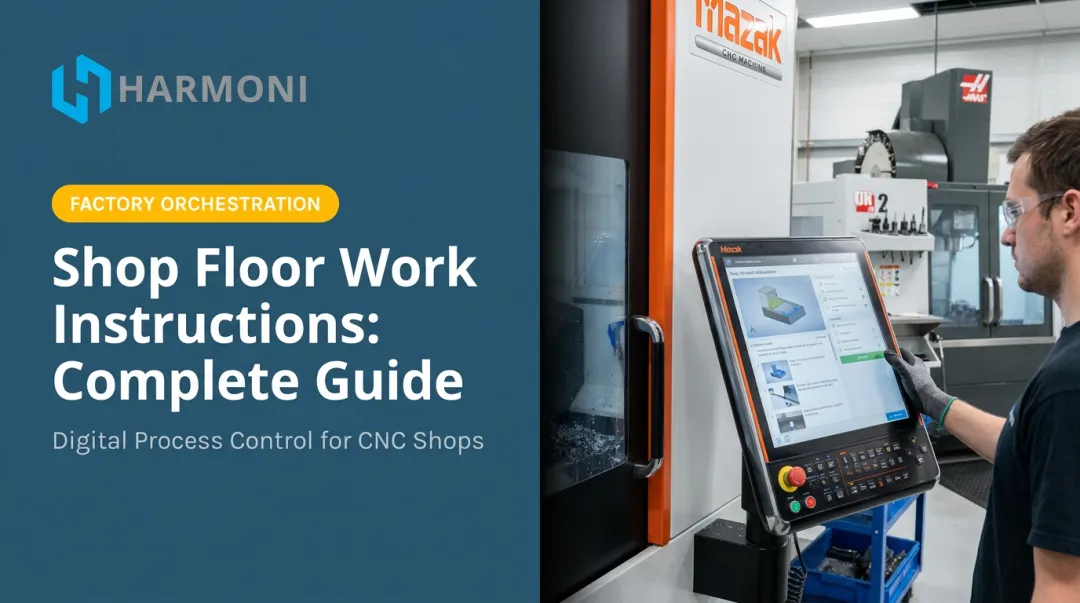
Delivering the correct work instruction to the right operator at the right machine — automatically, based on the detected job — eliminates a category of errors that paper-based processes create every day.
When operators pull the wrong revision, set up the wrong fixture, or work from a printed document that's two ECOs behind, scrap happens.
Harmoni links work instructions to parts, revisions, operations, or machines and surfaces the most specific applicable document the moment an operator approaches the terminal.
Key capabilities to look for:
- Automatic delivery based on RFID-detected job and part revision
- Engineering revision control that ensures only approved versions reach the floor
- Support for setup sheets, engineering drawings, and SOPs alongside work instructions
- Compliance alignment with ISO 9001, AS9100, and CMMC documentation requirements
MSI (Machine Specialties, Inc.) cited this feature directly — implementing Harmoni nearly eliminated errors in part counts, particularly on complex, high-risk parts across their aerospace and defense work.
Feature 5: Automated Job and Task Routing
Operators shouldn't spend their shift hunting for the next job or waiting for a supervisor to assign one. A capable solution queues work orders at each workcenter and keeps operators moving between value-added tasks without extra steps.
Harmoni uses RFID detection to identify the operator and any job traveling with RFID-tagged paperwork. When an operator approaches their terminal, the system surfaces:
- All auto-detected jobs in queue
- Correct programs and work instructions per job and revision
- Labor and quality data entry — right at the machine, not at a shared kiosk
This keeps operators at their machines rather than walking across the floor for information that should come to them.
Feature 6: Process Control and Error-Proofing (Poka-Yoke)
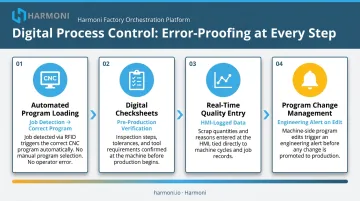
Digital process controls enforce critical steps before a job can proceed — preventing scrap at the source rather than catching it at inspection.
Harmoni's approach includes:
- Automated program loading: the detected job triggers the correct CNC program automatically, with no manual selection and no wrong-revision risk
- Digital checksheets: operators work through inspection checklists with target values, tolerances, check frequency, and required measurement tools before production starts
- Real-time quality entry: scrap quantities and reasons log at the HMI and tie to specific machine cycles for accurate OEE calculations
- Program change management: any machine-side modification triggers an engineering alert — the revision isn't promoted until approved
Feature 7: Labor Tracking and Accountability
Accurate labor data requires more than a badge swipe at a shared terminal. When operators walk to a kiosk to clock in, the data is already divorced from the machine it's supposed to describe.
Harmoni's long-range RFID antenna reads employee badges up to 15 feet away. As an operator approaches their machine, the system automatically identifies who they are and associates them with the detected job — no manual steps required. A live camera feed during clock-in prevents buddy punching.
What this generates:
- Time-on-job records automatically paired with machine spindle data
- Labor hours pushed directly into ERP for accurate job costing
- Quantities completed and scrapped recorded at the machine
- Real-time workforce visibility for managers without manual tracking
For ITAR/CMMC environments, Harmoni extends this to multi-factor authentication — combining RFID with PIN or facial recognition — restricting access to sensitive drawings, programs, and job data to authorized personnel only.
Feature 8: OEE Monitoring and Downtime Tracking
Vorne defines OEE as the percentage of planned production time that is truly productive, based on three factors: Availability, Performance, and Quality. 85% is the widely cited world-class benchmark for discrete manufacturing — but the more useful number is your current OEE compared to your theoretical capacity.
Harmoni tracks all three components in real time:
| OEE Component | How Harmoni Measures It |
|---|---|
| Availability | Categorized downtime reasons (changeover, breakdown, material wait, operator wait, quality hold) |
| Performance | Actual cycle time vs. ERP-estimated time per job |
| Quality | Operator-entered scrap quantities matched to specific machine cycles |
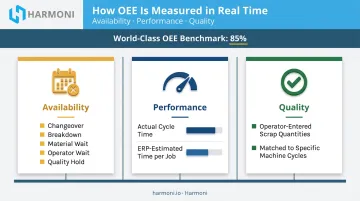
Operators see a visual indicator light at their machine — green, yellow, or red — reflecting live OEE status. Managers access real-time shop floor maps and performance dashboards with root-cause drill-down. This shifts downtime analysis from a weekly retrospective to a real-time response capability.
Feature 9: Automated Reporting and Analytics
Manual report compilation pulls engineering and management time into spreadsheet work instead of problem-solving. A modern digital shopfloor solution generates shift summaries, machine utilization reports, job cost actuals, and quality data automatically — without anyone building a spreadsheet.
Harmoni's dashboard architecture is role-based:
- Operators see live job status, performance indicators, and quality data at their terminal
- Supervisors access shop floor maps, bottleneck alerts, and downtime visibility across all active cells
- Managers and executives view plant-wide KPIs, labor efficiency, and production trends — with the ability to call the relevant work cell directly from an exception alert
Data is available at multiple cadences — live, hourly, shift, daily, and weekly.
Feature 10: Rapid Deployment and Scalability
A modern digital shopfloor solution should deploy in weeks, not quarters. Implementations that require custom development, infrastructure overhaul, or machine replacement aren't realistic for manufacturers who need to see ROI before budget reviews.
Harmoni's deployment speed comes from:
- Pre-built ERP connectors for Epicor, Infor, JobBoss, ABAS, and ODOO — ready out of the box
- Native machine compatibility across major controller brands with no hardware replacement
- Minimal operator training — the system is designed for busy shop floors, not IT departments
- No additional servers required, as each Harmoni terminal is self-contained
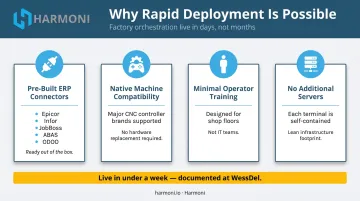
WessDel was live in less than a week, with operators trained and running at their machines instead of shared terminals. The documented return: over 5x the ongoing cost of the system, per month, in recovered productive hours alone.
How to Evaluate a Digital Shopfloor Solution
The most common mistake in solution selection: choosing based on what looked most impressive in a 60-minute demo. Features shown in a sandbox environment don't confirm that the platform actually integrates with your ERP, communicates with your specific machine controllers, or fits your production workflow.
What to Verify Before Selecting
- ERP integration depth — Is it a native, bidirectional connector to your specific ERP version, or a generic API that will require custom development?
- Machine controller compatibility — Does it support your actual controller brands and models, including legacy machines?
- Deployment timeline — Ask for documented customer go-live timelines, not vendor estimates
- Operator usability — Does the system reduce the burden on operators, or add new steps to their workflow?
- Measurable ROI — Ask for references in your vertical with specific outcome data: labor efficiency gains, scrap reduction, job costing accuracy
Once you've identified your must-verify criteria, use these questions to pressure-test vendor claims directly — in the call, not after contract signing.
Questions Worth Asking Vendors
- Which ERP systems do you have pre-built, production-tested integrations for?
- How do you connect to machines without modern communication protocols?
- What does the deployment process look like from contract to go-live?
- Can you share documented time-to-value metrics from customers in similar industries?
- What does the operator experience actually look like on day one?
LNS Research has documented integration compatibility failures as one of the most common causes of MES project breakdowns — shops assume compatibility, vendors don't correct them, and the mismatch surfaces after go-live. Ask for proof of integration with your specific ERP version and machine controllers before you commit to anything.
Conclusion
A modern digital shopfloor solution must do more than collect machine data. It has to coordinate people, systems, and machines to improve execution consistency, eliminate waste, and give management a real-time view of what's happening on the floor — before the shift-end review, when corrections still matter.
Prioritize solutions that integrate deeply with your existing ERP and machine ecosystem, deploy without major disruption, and deliver measurable outcomes within weeks.
Harmoni's factory orchestration platform is purpose-built to sit between your ERP, machines, and operators — eliminating wasted time, preventing errors, and giving you the real-time visibility you need to act before problems compound. Request a free demo to see how it works in a shop like yours.
Frequently Asked Questions
What is shop floor digitalization?
Shop floor digitalization is the process of replacing manual, paper-based production tracking with software systems that collect, connect, and display production data in real time. It enables faster decisions and more consistent execution by giving operators, supervisors, and managers accurate information when they need it.
What is shop floor software?
Shop floor software is any platform that manages and monitors manufacturing operations at the production level — including job tracking, machine monitoring, operator guidance, and quality control. Most platforms integrate with ERP and MES systems to connect shop floor activity with enterprise data. Factory orchestration platforms represent the next evolution, adding active coordination across operators, machines, and workflows in a single system.
What are the three phases of shop floor control?
The three phases are: order release (dispatching work orders to the floor), order monitoring (tracking job progress, machine status, and labor in real time), and order completion (closing jobs with actual time, labor, and quality data fed back to the ERP).
What is the difference between a MES and a digital shopfloor solution?
A traditional MES focuses on production scheduling, work order execution, and data collection. A modern digital shop floor solution — or factory orchestration platform — adds an active coordination layer that connects operators, machines, and ERP workflows, turning planned production schedules into consistent real-world execution.
How does a digital shopfloor solution integrate with ERP systems?
Integration is typically achieved via APIs or pre-built connectors to common ERP platforms, enabling bidirectional data flow for work orders, labor hours, production quantities, scrap, and job costing — without manual re-entry on either side.
How long does it take to implement a digital shopfloor solution?
Modern solutions with pre-built ERP and machine integrations can go live in weeks — Harmoni deployed at WessDel in under a week. Highly customized or legacy-dependent implementations take longer, so always ask vendors for documented customer go-live timelines.