
Introduction
Picture this: your most experienced machinist retires after 22 years. She could set up a complex fixture from memory, knew exactly where that one tricky tolerance required a second look, and had a mental checklist that never missed a beat. On her last day, all of that walks out the door.
This scenario plays out constantly across manufacturing. According to the Manufacturing Institute and Deloitte, manufacturers may need as many as 3.8 million new employees by 2033, with 1.9 million roles potentially going unfilled. Without structured work instructions, every retirement is an uncontrolled knowledge loss event.
Shop floor work instructions are step-by-step operational documents that tell operators exactly how to perform a task correctly, safely, and consistently. This guide covers what they are, what makes them effective, how to write them, and why delivery method matters just as much as content.
This is written for operations managers, plant managers, manufacturing engineers, and anyone responsible for how work actually gets done on the production floor.
Key Takeaways
- Work instructions are task-level documents guiding operators through specific manufacturing steps, distinct from SOPs or engineering drawings.
- Vague or outdated instructions directly cause scrap, rework, safety incidents, and slow onboarding.
- Good instructions use active language, visual references, and embedded quality checkpoints.
- Digital delivery outperforms paper on version control, traceability, and operator access speed at the machine.
- Instructions reach maximum value when connected to job orders, machine data, and operator workflows in real time.
What Are Shop Floor Work Instructions?
Work instructions are standardized, task-level documents that answer one question: How exactly do I do this, right now, at this machine?
That's a narrower question than an SOP answers. SOPs describe overall processes, responsibilities, and policies. Engineering drawings define geometry and tolerances. Work instructions sit below both — they tell an operator what to pick up, where to put it, how tight to torque it, and what a good result looks like before moving to the next step.
Common Types Found on the Production Floor
| Type | What It Covers |
|---|---|
| Setup instructions | Machine configuration, tooling, fixtures, program selection, offsets |
| Operational/process instructions | Step-by-step task execution for a specific operation |
| Quality inspection steps | In-process checks, measurements, pass/fail criteria |
| Safety/compliance procedures | PPE requirements, lockout/tagout, hazard controls |
These documents can exist as printed paper, PDFs, or screen-based digital formats. That format choice has a bigger impact on execution consistency than most manufacturers expect.
Why Work Instructions Matter: Quality, Safety, and Consistency
Consistency Drives Predictable Output
When every operator follows the same precise steps, quality becomes repeatable across shifts, machines, and facilities. The inverse is also true: without standardized procedures, output quality depends on whoever showed up today and how well they remember last week's verbal instructions.
The IISE estimates the cost of poor quality in manufacturing ranges from 5% to 35% of sales — a range that covers everything from scrap and rework to customer returns and lost contracts. While not every dollar in that range traces back to missing work instructions, inconsistent process execution is one of the most consistent contributing factors.
Safety and Regulatory Compliance
Clear instructions reduce guesswork in high-stakes steps. For operations involving hazardous energy, OSHA 1910.147 requires that energy-control procedures be developed, documented, and used — specifying exactly how to shut down, isolate, and verify equipment.
Vague procedures aren't just a compliance gap — they carry documented consequences. A peer-reviewed study found 592 lockout/tagout incidents and 624 fatalities in manufacturing between 1984 and 1997, with caught-in/between events accounting for 52.1% of those deaths.
For manufacturers in aerospace, defense, and medical devices, work instructions also satisfy documentation requirements under ISO 9001, AS9100, and FDA 21 CFR 820.70 — each requiring controlled, point-of-use documentation for production processes.
Knowledge Transfer and Onboarding
Structured instructions capture what experienced operators know and make it available to everyone. Without them, new hires learn from whoever is available — which means inconsistent training and slower ramp-up.
With the manufacturing workforce aging and nearly 2 million jobs potentially unfilled by 2033, knowledge transfer is already a production floor problem, not a future one. Shops that document process steps now protect output quality as their most experienced operators retire.
Error Prevention
Quality checkpoints embedded at critical steps catch defects before they pass downstream. When an operator has no written guidance, the outcome depends on experience they may not yet have. Common results include:
- Defects passed to downstream operations before detection
- Judgment calls that vary operator-to-operator on the same job
- Nonconformance events that trace back to missing process documentation during root cause analysis
What Good Shop Floor Work Instructions Look Like
Write for the Operator, Not the Engineer
Instructions should use direct, active commands. Compare these two examples:
- ❌ Vague: "Assemble the bracket per engineering drawing."
- ✅ Specific: "Position the aluminum bracket flush against the datum surface. Install four M8 bolts finger-tight, then torque in a cross pattern to 25 Nm. Verify torque with checkmark stamp on traveler."
The second version leaves no room for interpretation. An operator reading it mid-task, with noise and time pressure, gets exactly what they need. The first version requires the operator to go find the drawing, interpret it, and hope they understand it correctly.
Visuals Are Not Optional
Photographs, annotated diagrams, and short videos are the core of effective shop floor communication — not enhancements added after the text is written. A photo showing exactly where a wiring terminal connects, with an arrow and a callout reading "red wire, left terminal," communicates in seconds what a paragraph cannot.
Every visual should show:
- What to do
- Where to do it
- What the correct outcome looks like
Required Structural Elements
A well-built work instruction includes all of the following, consistently across every document:
- Safety warnings and PPE requirements — at the top, before any steps
- Required tools and materials — with specific part numbers, settings, or model numbers
- Numbered steps — one action per step, no compound instructions
- Critical-to-quality checkpoints — with explicit pass/fail criteria, not just "inspect quality"
- Revision and version information — date, revision level, document owner
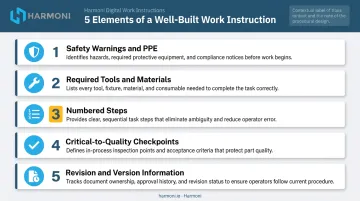
These elements must be standard, not left to the author's judgment. A work instruction that has torque specs in some documents and not others is only partially effective. That same inconsistency is exactly what floor-based development prevents.
Build Instructions From the Floor, Not the Desk
Effective instructions are developed by observing the task being performed — by both experienced and newer operators. Ask at each step: What is the most common way this goes wrong? The answer belongs in the instruction itself, as failure-prevention language written directly into the step.
Engineering docs alone miss the gaps that only floor observation reveals.
Paper vs. Digital Work Instructions
Where Paper-Based Systems Break Down
Paper-based work instructions create real operational risk. The core failures:
- Printed documents go stale the moment an engineering change is approved
- Updating paper means physically tracking down and replacing every copy at every workcenter
- There's no way to confirm an operator used the current revision
- A printed page can't show a video of the correct motion or an interactive step sequence
- Paper leaves no evidence of whether instructions were read, used, or skipped entirely
What Digital Work Instructions Change
Digital delivery addresses every one of those failure modes:
- Updates push instantly to every workcenter when an engineering change is approved
- The system presents only the current revision — outdated versions aren't accessible
- Instructions support annotated images, video, and interactive step-by-step guidance
- Delivery is contextual — the right instruction appears automatically for the job in progress
- Operator interaction is logged, creating an audit trail for quality and compliance
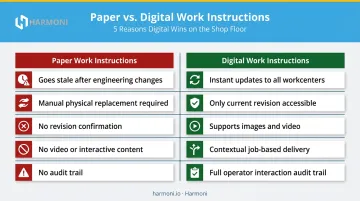
The audit trail carries particular weight in regulated environments. For aerospace manufacturers working under AS9100 or defense contractors handling CUI, documented evidence that the correct procedure was followed isn't optional.
How Harmoni Delivers Instructions at the Workcenter
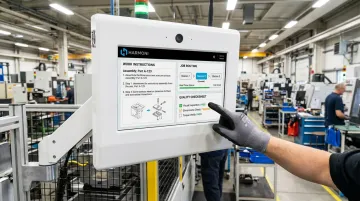
Harmoni's factory orchestration platform uses long-range RFID technology to automatically identify the operator and the job at each workcenter. When an operator approaches the Harmoni terminal — a machine-side touchscreen command center — the system detects both the employee badge and the job's RFID tag.
It then instantly surfaces the correct work instructions, setup sheets, drawings, and quality checksheets for that specific job and part revision.
No searching. No printing. No risk of grabbing an outdated revision.
When engineering teams update a document, the new version is linked to the corresponding part revision. Because the terminal only presents instructions matched to the detected job, operators automatically receive current documentation. As Harmoni puts it: "Gone are the days of printing work instructions for the wrong part or an old revision."
For defense manufacturers, Harmoni's Government Cloud deployment (portal.us.harmoni.io) adds multi-factor authentication — requiring PIN or biometric confirmation before operators can access controlled technical data — supporting CMMC and DFARS-aligned access management requirements.
How to Write Effective Shop Floor Work Instructions
Step 1 — Observe and Capture the Real Task
Conduct a proper task analysis before writing a single step:
- Observe the process with both an experienced operator and a newer one — the differences reveal undocumented knowledge
- Interview quality and maintenance staff — they see the downstream consequences of steps done incorrectly
- Ask explicitly: What commonly goes wrong here? What do new people get wrong?
- Document what you see, not just what the engineering spec describes
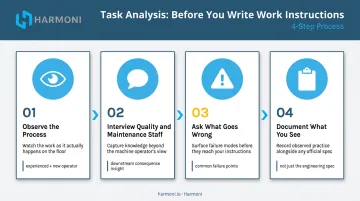
Drawing-only instructions routinely miss the practical details that prevent errors. Floor observation is not optional.
Step 2 — Draft, Then Validate on the Floor
Use a standard template with all required elements. Write one action per step. Add a visual reference at every critical moment.
Validation means putting the draft in front of an operator who has never performed the task:
- Hand them the draft with no coaching
- Watch where they pause, hesitate, or improvise
- Treat every point of confusion as a gap to close before publishing
The only real test is whether a new operator can execute the task correctly using only what's written.
Step 3 — Publish With Version Control and a Review Schedule
Every instruction needs:
- A defined document owner responsible for keeping it current
- A version control system — especially critical in digital platforms where multiple revisions may exist in the database
- A review trigger tied to process changes, engineering updates, or quality events
- A minimum periodic review cadence (annually at minimum; semi-annually in fast-changing environments)
Outdated instructions in a digital system are as dangerous as no instructions at all. A complete version control process includes a retirement step — superseded revisions must be archived and removed from active use, not just labeled as old.
How Work Instructions Fit Into Your Broader Shop Floor Ecosystem
Work instructions stored in a separate folder — whether paper or digital — function as reference documents. Work instructions embedded in the production workflow function as operational controls. In practice, that distinction determines whether your documented process is followed or ignored.
Connected Instructions vs. Isolated Documents
When instructions are tied to ERP job orders, routing sequences, and machine data, operators get the right guidance at the right moment without extra steps. This is the architecture ISA-95 describes: a Job Order references a Work Master (the procedure to be followed), and that procedure is surfaced through the execution system when the job runs.
Harmoni sits at this intersection. The platform pulls job data from ERP systems like Epicor, Infor, and JobBoss, links it to the corresponding work instructions, and presents everything at the workcenter terminal when the RFID-detected job begins. Labor tracking, quality checksheets, and machine data all connect through the same interface: operators work from one terminal, and managers monitor everything from one unified view.
Machine Specialties, Inc. (MSI), a precision manufacturer serving aerospace, defense, and medical customers, implemented Harmoni's integrated platform to manage work instructions, programs, and checksheets through a centralized change management system. The result: only approved, current documents reach each workcenter, and part count errors on complex, high-risk jobs were nearly eliminated.
Visibility That Drives Continuous Improvement
When work instructions are digitally integrated, operations leaders gain visibility they can't get from paper. Harmoni's platform combines machine data, operator activity, and production order status in real time — enabling managers to see not just whether an instruction exists, but whether work is progressing as expected, where delays originate, and where quality escapes occur.
That shift matters for continuous improvement. When every job execution generates data — cycle times, quality outcomes, operator activity — you have an actual baseline to measure against. Static paper documents don't give you that. Integrated digital instructions do.
Frequently Asked Questions
What are some examples of good work instructions?
A good work instruction step looks like this: "Install the four M8 socket head cap screws finger-tight. Torque in a cross pattern to 25 Nm ± 2 Nm. Verify with torque wrench — check box on traveler before proceeding." This is specific, actionable, and includes a quality checkpoint. A poor instruction says "assemble the bracket" and leaves the operator to interpret everything else.
What are shop floor practices?
Shop floor practices are the standardized methods, behaviors, and routines that govern how work is performed on the production floor — including how operators start jobs, execute setups, check quality, and hand off work between shifts. Work instructions are the documented foundation that makes those practices consistent and teachable.
What's the difference between an SOP and a work instruction?
SOPs describe overall processes, responsibilities, and policies at a higher level. Work instructions provide granular, task-specific steps for a single operation — the "how exactly" beneath the SOP's "what and why." An SOP might describe the overall inspection process; a work instruction tells the operator precisely which measurement to take, with which tool, at which step.
How do digital work instructions reduce production errors?
Digital instructions reduce errors by delivering the current, correct version of a procedure at the moment it's needed — automatically, based on the job in progress. They eliminate outdated paper documents, enforce step-by-step progression, and require quality checkpoints before advancing. Operators can't accidentally grab last month's revision.
How do you create work instructions for a manufacturing process?
- Observe the task with both experienced and new operators on the floor.
- Document each action in clear, active language with visuals at critical steps.
- Validate by having an unfamiliar operator follow the draft cold.
- Publish with version control and a scheduled review cadence.
How often should shop floor work instructions be updated?
Instructions should be reviewed whenever a process change, engineering update, or quality event occurs — and at minimum annually. The update process must also retire or replace outdated versions from every access point. An instruction that coexists with its old revision in the same system is a version control failure.