Introduction
Manufacturing ERP integration is one of the most technically demanding initiatives a plant team can undertake — and buying the ERP is the easy part. The real work begins when you need your ERP to exchange accurate, real-time data with MES platforms, CNC machines, supplier tools, and financial systems that were never designed to talk to each other.
The people driving these projects (operations managers, IT leads, plant directors) typically hit the same walls. Conflicting data formats, legacy machine controllers that predate modern communication standards, and a fundamental mismatch between ERP business logic and shop floor reality all compound each other.
This guide covers the complete process: readiness assessment, architecture decisions, step-by-step integration, post-go-live validation, and the most common failure points, with practical fixes for each.
Key Takeaways
- ERP integration fails most often during planning, not execution — data mapping errors and incompatible systems are the leading causes
- Choose your integration architecture (point-to-point vs. middleware/orchestration) before connecting a single system
- Follow the sequence: readiness → architecture → phased connections → parallel testing → validation → ongoing monitoring
- Skip post-integration validation and inventory discrepancies or job costing errors can go undetected for weeks
- Real-time visibility across machines, operators, and ERP transactions confirms the integration is doing its job
Prerequisites and Readiness for ERP Integration
ERP integration in manufacturing most often fails in the planning phase, not during execution. Manufacturers who skip readiness checks often discover mid-project that their data is inconsistent, their systems are incompatible, or their approach doesn't fit the shop floor environment.
System Compatibility and Data Readiness
System compatibility means more than whether two systems can theoretically connect. In practice, it means:
- ERP API availability : does your ERP vendor publish documented API capabilities?
- Machine communication protocols : do your CNC controllers support MTConnect, OPC-UA, FANUC FOCAS, or Siemens SINUMERIK OPC-UA?
- Legacy equipment gaps : older CNC controllers often cannot expose usable data without an intermediary agent or adapter
Data readiness is equally critical. Panorama Consulting's manufacturing ERP data readiness guidance identifies the most common problems manufacturers discover too late: duplicate item masters, inconsistent part numbering, obsolete supplier records, and missing data ownership. Bad data migrated into an integrated environment doesn't stay contained — it multiplies errors across every connected system.
Integration should not proceed if:
- The ERP lacks documented API capabilities
- Shop floor machines cannot communicate via any supported protocol
- No one has been assigned ownership of data governance
Choosing Your Integration Architecture
Two primary approaches exist, and the choice has long-term consequences.
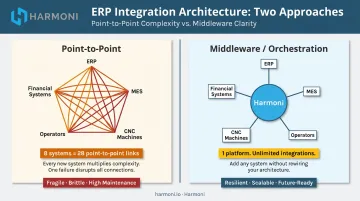
Point-to-point: Each system connects directly to the ERP. Simpler to start, but brittle. As MuleSoft's analysis of point-to-point integration notes, these connections become increasingly difficult to manage as systems are added — five systems create ten possible links, eight create twenty-eight.
Middleware/orchestration layer: A platform sits between the ERP, MES, machines, and operators to normalize and route data. More resilient, easier to extend, and capable of adding operational context that ERP alone cannot capture.
For mid-to-large manufacturers running multiple machine types and ERP workflows, an orchestration approach is worth the additional setup. Platforms like Harmoni go further than data routing: they integrate natively with ERPs including Epicor, Infor, and JobBoss, as well as machine controls from Fanuc, Haas, and Mazak. By combining operator activity, RFID-based job detection, and real-time machine states into the ERP data layer, they capture the operational context that point-to-point connections miss entirely.
How to Integrate Your Manufacturing ERP: Step-by-Step
ERP integration follows a defined sequence. Compressing or skipping steps — especially testing — is the most common cause of expensive rework after go-live.
Steps 1–3: Map, Scope, and Configure
Step 1 — Map current workflows and data flows
Document how production orders, work orders, inventory transactions, time entries, and quality records move between departments today. Every point where data is manually re-entered, delayed, or reconciled is an integration priority. If your team spends time on daily CSV imports or reconciliation tasks, those are your first targets.
Step 2 — Define integration scope and phasing
Don't try to connect everything at once. Most manufacturers start with inventory and production order sync before tackling machine data or financial modules. Set a phased timeline with clear milestones, and assign an integration owner for each system connection.
Step 3 — Configure APIs and data mapping
Work with ERP vendor documentation and connected system providers to establish field mappings. Confirm that part numbers, work center codes, cost categories, and unit-of-measure conventions align across all systems.
Warning: Mismatched field definitions are the leading cause of silent data errors post-integration. A part number formatted differently in your ERP versus your MES will pass through validation and create incorrect records that are difficult to trace.
Steps 4–6: Connect, Test, and Validate
Step 4 — Integrate shop floor and machine data
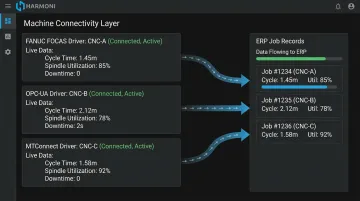
Step 4 is the most technically complex. CNC machine controllers do not natively communicate with ERP software — they require a middleware agent or orchestration layer to translate machine-native protocols into ERP-usable production records.
Harmoni handles this through protocol-specific drivers: FANUC FOCAS for Fanuc controllers, OPC-UA for Siemens, MTConnect for compatible machines, and analog current sensors for legacy equipment with no modern protocol support. The output is structured production data (cycle times, spindle utilization, downtime events) that flows directly into ERP job records without manual entry.
Step 5 — Connect financial and supply chain modules
Once production data flows reliably, connect the financial layer. Key modules to integrate at this stage:
- Procurement and accounts payable
- Inventory valuation and material consumption
- Labor and machine time posting to job cost records
This closes the loop between shop floor activity and financial reporting, making accurate job costing achievable for the first time.
Step 6 — Conduct phased testing with real production data
Run parallel operations using a controlled batch of live jobs. Test order creation, inventory consumption, machine event recording, and financial posting end-to-end before expanding the rollout. Don't use synthetic test data — only real production scenarios expose the edge cases that break integrations.
Post-Integration Checks and Validation
Post-integration validation is not a one-time event. Manufacturers who skip it often discover discrepancies in inventory counts, job costs, or production reporting weeks after go-live. By that point, root causes are difficult to isolate.
Functional Checks to Run Immediately After Go-Live
- Confirm work orders created in the ERP trigger accurate material pulls in inventory
- Verify that cycle times, operator logins, and job completions recorded on the shop floor appear correctly in ERP production records
- Validate that cost postings match actual material and labor costs, not estimates
What Correct Integration Looks Like
In a properly integrated environment, a job cost report generated after production completion should match:
- Labor hours logged by operators at the machine
- Machine time recorded by the shop floor system
- Material quantities consumed against the BOM
Discrepancies point to a data mapping error, a sync delay, or a missing data source. MESA's guidance on manufacturing data mapping notes a granularity consideration worth addressing: automation systems may collect data every second while ERP may only require hourly production counts. Set latency thresholds by use case — near-real-time for machine state and dispatching, batch windows for costing and finance.
Ongoing Validation Through Real-Time Dashboards
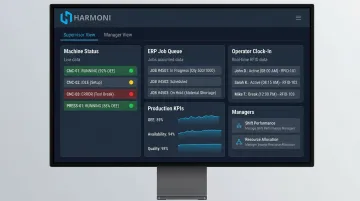
Real-time dashboards that unify machine data, ERP workflow status, and operator activity serve as an ongoing validation mechanism. They surface integration gaps as they occur, not after production is complete.
What to look for in a well-integrated dashboard:
- ERP job status matches actual shop floor progress in real time
- Machine-recorded cycle times appear in ERP production records without delay
- Operator clock-in/out events flow into job cost records automatically
Harmoni's dashboards pull from machines, ERP systems, and RFID-based operator data simultaneously, giving supervisors, managers, and executives role-specific views of production performance. When a data source drops out or a sync breaks, gaps appear in the unified view. Integration health becomes visible without anyone having to check manually.
Common ERP Integration Problems and How to Fix Them
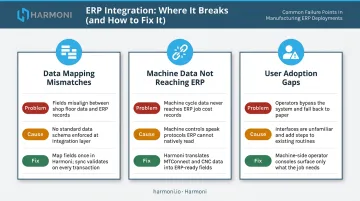
Even well-planned ERP integrations run into the same failure points. The three below account for the majority of go-live issues in discrete manufacturing environments.
Data Mapping Mismatches
Problem: ERP records show inventory discrepancies or incorrect job costs immediately after go-live.
Cause: Misaligned field definitions between systems — unit-of-measure conventions, work center codes, or part number formats that differ between the ERP and connected shop floor systems.
Fix: Conduct a full data mapping audit before live cutover. Implement a field validation layer in the integration middleware that flags mismatches before records are written to the ERP.
Machine Data Not Reaching the ERP
Problem: Shop floor machine events — cycle starts, downtime, job completions — are not appearing in ERP production records.
Cause: Unsupported communication protocols between legacy CNC controllers and the ERP, or a missing middleware agent.
Fix: Implement a machine connectivity layer that translates machine-native protocols (MTConnect, FANUC FOCAS, Siemens OPC-UA) into ERP-compatible data streams. Do not attempt direct ERP-to-machine connections without confirming protocol compatibility. For machines with no supported protocol, analog current sensors can infer machine state from power consumption.
User Adoption Gaps Creating Manual Workarounds
Problem: Operators bypass the integrated system and continue logging jobs manually, creating parallel data records that undermine ERP accuracy.
Cause: The integrated interface adds steps to operator workflows rather than reducing them.
Fix: Design operator-facing touchpoints to be faster than prior manual methods — not just different. Harmoni's RFID-based approach, for example, detects operator badges and job paperwork automatically within 15 feet. That reduces clock-in to a few taps rather than a multi-step data entry sequence. Involve shop floor operators in workflow design before go-live, not after.
Pro Tips for ERP Integration Success in Manufacturing
ERP integration success depends less on technology selection and more on how you manage the process over time. These three principles separate stable, production-ready integrations from ones that quietly fail under real shop floor conditions.
- Start with two or three high-impact data flows — real-time job status, inventory consumption, labor tracking — before expanding scope. Not every system needs to connect on day one; stability in critical flows matters more than breadth.
- Build integration monitoring into standard operations. Manufacturing environments shift constantly: new machines come online, ERP modules update, processes evolve. When a change happens, it should trigger an integration review — not break data flows undetected.
- Document every connection and assign a named owner. For each touchpoint, record the data fields mapped, sync frequency, responsible team member, and escalation path. Without it, diagnosing failures before they hit production becomes nearly impossible.
Frequently Asked Questions
What is the difference between ERP integration and ERP implementation in manufacturing?
ERP implementation is the initial deployment and configuration of the ERP system itself. ERP integration is the ongoing process of connecting that ERP to other systems (MES platforms, machines, financial tools, and supplier platforms) so data flows automatically between them rather than requiring manual entry or reconciliation.
What systems does a manufacturing ERP typically need to integrate with?
Common integration targets include:
- MES platforms and shop floor execution systems
- CNC machines and their controllers
- Inventory and warehouse management systems
- Supply chain and procurement tools
- CRM and financial/accounting software
The machine layer is the most technically complex — controllers use manufacturer-specific protocols that require translation before ERP systems can consume the data.
How long does ERP integration typically take in a manufacturing environment?
Core module integrations can go live in weeks with the right middleware — Harmoni has customers operational in under a week in some cases. Full shop floor and financial integration across a large facility takes longer, depending on protocol readiness and data quality.
What is the most common reason manufacturing ERP integration fails?
Poor data preparation before integration begins, lack of field-level data mapping between systems, and the gap between ERP logic and shop floor reality. Machines that cannot natively communicate with ERP software without an intermediary translation layer are a frequent source of that gap.
Do manufacturers need a separate MES if they already have an ERP?
ERP and MES serve different functions: ERP handles business-level planning (costing, procurement, finance), while MES manages shop floor execution in real time. Most manufacturers run both, connected through an integration or orchestration layer that keeps shop floor events and ERP records in sync.
How can manufacturers confirm that their ERP integration is working correctly?
Validation involves cross-checking that shop floor events (job completions, machine cycles, operator time) appear accurately in ERP production and financial records. Real-time dashboards that combine machine, operator, and ERP data provide ongoing confirmation, surfacing data gaps immediately when a sync breaks rather than after production is complete.