That gap between when a problem starts and when someone discovers it is exactly what production tracking is designed to close. This guide is for manufacturers who want to move from reactive discovery to real-time awareness: what production tracking actually is, which metrics matter, how to choose and implement the right method, and what to plan around when things get complicated.
Key Takeaways
- Production tracking captures output, downtime, cycle time, quality rate, and OEE — giving decision-makers an accurate, timely picture of shop floor performance
- Real-time tracking enables intervention while a problem is active; end-of-shift tracking means acting after capacity is already lost
- Effective implementation requires defined metrics, reliable data sources, and a documented response process alongside the right software
- Factory orchestration platforms go beyond data collection to coordinate people, machines, and ERP workflows in real time — Harmoni pioneered this category
What Is Production Tracking?
Production tracking is the systematic process of monitoring, recording, and analyzing performance data — output quantities, equipment status, cycle durations, and quality outcomes — across machines, lines, and cells throughout a manufacturing operation. What distinguishes it from general operational reporting is timing: data is captured continuously or in near-real time, not reconstructed after the fact from memory and paper logs.
That real-time capture spans three stages of the production flow:
- Input: Raw material quantities entering production
- Work-in-progress: Performance at each operation as jobs move through the routing
- Output: Finished goods counts measured against a defined plan
That data gets tied to KPIs and surfaced to the right people fast enough to act on — before a slow machine, a missed step, or a quality deviation compounds into a larger problem.
How Production Tracking Differs from Machine Monitoring and MES
These three terms get used interchangeably, but applying the wrong one means buying the wrong tool:
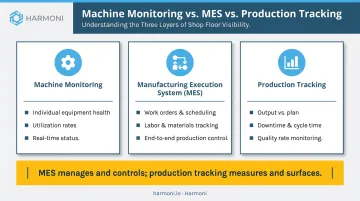
- Machine monitoring focuses on individual equipment health, utilization, and status
- A Manufacturing Execution System (MES) manages and controls production operations end to end, including work orders, scheduling, labor, and materials
- Production tracking measures performance metrics — output vs. plan, downtime, cycle time, quality rate — to reveal where capacity is being lost and why
Production tracking is one function within most MES platforms, but it can also operate independently through dedicated tools or factory orchestration platforms. The key distinction: MES manages and controls; production tracking measures and surfaces.
Core Metrics Every Manufacturer Should Track
Five measurement areas tell you where capacity is actually going. Each one targets a different failure mode — availability losses, performance losses, or quality losses — and together they give you a complete picture of what's happening on the floor.
Production Output vs. Plan
Units produced per shift or per day, measured against a defined target. The gap between actual and planned output is the most immediate signal that something is underperforming. Without a target to compare against, raw output numbers are nearly meaningless.
Downtime: Planned vs. Unplanned
Planned downtime covers scheduled changeovers and preventive maintenance windows. Unplanned downtime covers equipment failures, tooling issues, and material shortages — and it is the single largest driver of availability loss for most discrete manufacturers.
Deloitte reports that poor maintenance practices can reduce productive capacity by 5% to 20%, though averages vary significantly by facility and equipment age. The category distinction matters because planned downtime is manageable by definition; unplanned downtime is the recoverable loss worth attacking first.
Cycle Time and Cycle Time Variance
Cycle time measures the elapsed time to complete one unit or operation — but variance is the more actionable signal than the average. Consistent overruns from standard signal tooling wear, programming inefficiency, or fixturing problems, all of which are correctable once visible. For CNC, aerospace, and precision manufacturers, cycle time also drives job costing accuracy directly: if actual cycle times diverge from standards, every job cost estimate built on those standards is wrong.
Quality Rate and First-Pass Yield
First-pass yield is the percentage of units that meet specification without rework or scrap on the first attempt. Tracking it at the machine or cell level — rather than at the end of the line — lets quality losses be traced to their source immediately, before a full batch is complete.
OEE (Overall Equipment Effectiveness)
OEE combines all three loss categories into a single percentage: Availability × Performance × Quality. It provides a standardized benchmark for comparing machines, shifts, product families, and facilities over time.
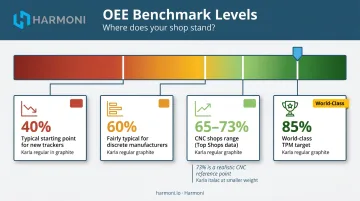
The world-class OEE benchmark of 85% — established through Seiichi Nakajima's TPM work — assumes component targets of 90% availability, 95% performance, and 99.9% quality. In practice, most discrete manufacturers sit well below that threshold.
Real-world benchmarks give a more grounded starting point:
- 85% — world-class target (Nakajima TPM standard)
- 73% vs. 65% — top CNC shops vs. other shops (Modern Machine Shop Top Shops data)
- 60% — fairly typical for discrete manufacturers
- 40% — not uncommon when a shop begins tracking for the first time
For most machining environments, the 73% / 65% CNC benchmark is a more realistic reference point than the 85% world-class target.
Production Tracking Methods: Manual, Automated, and Orchestrated
The right method depends on how quickly the operation needs to act on data, the facility's complexity, and available budget. Manual and automated approaches aren't mutually exclusive — most shops begin with manual tracking and layer in automation on the highest-priority assets first.
Manual Tracking
Operators record output counts, stoppage reasons, and quality events on paper or spreadsheets at the end of operations or shifts. The advantage: near-zero upfront cost, no integration required.
The limitations compound quickly:
- Data arrives at the end of a shift, after the window to intervene has closed
- Transcription errors and rounding reduce accuracy
- Micro-stoppages under five minutes — which OEE.com identifies as chronic, untracked losses that operators often become blind to — almost never appear in manual logs
Despite those limitations, the Manufacturing Leadership Council reported in 2024 that 70% of manufacturers still collect data manually, even as 44% said their data volume had at least doubled in the prior two years. The burden is growing while the method stays the same.
Automated Tracking with IIoT Sensors and MES
Automated production tracking uses PLC and machine controller signals, IoT sensors, vision systems, and dedicated counter hardware to capture every production event — cycle complete, machine stop, quality reject — without requiring operator input. Data flows to a centralized dashboard or MES in real time.
Supervisors see a problem developing during a shift, not after it ends. The trade-offs are worth understanding before committing:
- Higher upfront hardware and integration investment than manual methods
- Older machines may require edge gateways or retrofit hardware to connect
- Integration complexity scales with the number of machine types and controls on the floor
The adoption curve is accelerating. Deloitte's 2025 survey of 600 US manufacturing executives found 46% had implemented IIoT solutions, with the majority citing smart manufacturing as the primary competitiveness driver over the next three years.
Factory Orchestration: Connecting Machines, Operators, and ERP in Real Time
Factory orchestration goes beyond passive data collection. Where traditional tracking records what machines produced, an orchestration platform actively coordinates machines, operators, and ERP work orders through a unified, real-time view at each workcenter.
The distinction matters in practice: monitoring tells you what happened; orchestration surfaces problems while they're still occurring and delivers context to operators at the point of work — which job, which operation, which specification.
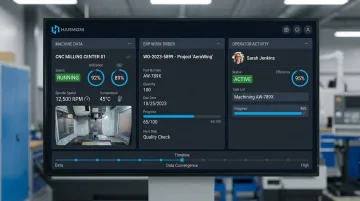
Harmoni is a factory orchestration platform built specifically for this role. Through long-range RFID, it automatically detects employees and jobs at each workcenter, eliminating manual check-ins entirely. Machine data, ERP work order information, and operator activity converge in a centralized command center at each machine — giving operators and managers a shared, real-time picture rather than fragmented systems they must reconcile separately.
How to Implement Production Tracking Step by Step
The most common reason production tracking programs fail isn't the software or the hardware — it's the absence of a defined response process. Data that no one acts on is just expensive data collection.
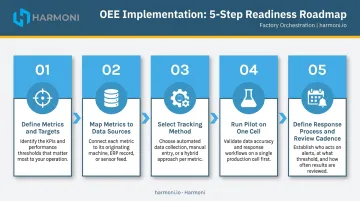
Step 1: Define What to Track and Set Targets Before Collecting Data
Start with 3–5 metrics tied directly to the highest-priority pain points:
- If unplanned downtime is the known problem, prioritize availability and downtime categorization
- If job costing is inaccurate, prioritize cycle time vs. standard
- If scrap rates are climbing, prioritize first-pass yield at the cell level
Target values must be defined before data collection begins. Without a baseline, deviations trigger debate about whether the number is plausible rather than action to fix it.
Step 2: Map Each Metric to a Specific Data Source
For each metric, identify exactly where the data will come from:
| Metric | Possible Data Source |
|---|---|
| Output counts | PLC cycle-complete signals, photoelectric sensors |
| Cycle time | Spindle telemetry, G-code parsing, start/stop signals |
| Downtime reason | Brief operator input to label cause |
| Labor activity | Operator workstation login, RFID badge detection |
| Job-level targets | ERP work orders pulled into the tracking system |
Legacy machines without native connectivity will require hardware gateways — plan for this before purchasing.
Step 3: Select the Right Tracking Method
Ask four practical questions before choosing a platform:
- How fast does the team need to act on data — real-time or end-of-shift?
- Does the facility track jobs and work orders, or just machines?
- Does the solution integrate with the existing ERP and machine types already in use?
- What's the realistic deployment timeline given available IT resources?
Platforms like Harmoni deploy in weeks rather than months and include pre-built integrations with common ERPs (Epicor, JobBoss, Infor, ABAS) and machine controllers (Haas, Fanuc, Mazak, Siemens, DMG MORI), cutting integration time and cost compared to custom builds.
Step 4: Run a Pilot on One Cell Before Scaling
Scope the initial deployment to one cell or 1–3 machines with repeatable jobs and clear baseline metrics. Run the pilot for 4–8 weeks.
During the pilot:
- Record baseline throughput, cycle time, downtime, and operator activity before go-live
- Validate that system-captured data matches physical counts or stopwatch measurements
- Train operators with short, on-floor sessions focused on what the data means and what to do when an alert appears
Confirm data accuracy before expanding. Catching data errors at 3 machines costs an afternoon — catching them at 30 machines costs a program restart.
Step 5: Define the Response Process and Review Cadence
Before go-live, document three things:
- Who receives which alerts for machine stops, output shortfalls, and quality rejects
- What the escalation path looks like if an issue isn't resolved within a defined time window
- How production data is reviewed — a daily or shift-end cadence using live tracking data is far more actionable than a weekly summary report
The review cadence determines whether the investment pays off. Tracking without a structured response process is observation, not management.
Common Challenges in Production Tracking — and How to Solve Them
Data Accuracy and Siloed Systems
When machine data, operator activity, and ERP work order data live in separate systems that don't communicate, the composite picture of shop floor performance is always incomplete. Reconciling silos manually is slow and error-prone.
The fix: Prioritize tracking tools that unify machine, operator, and ERP data into a single source of truth. Adding another standalone data stream to reconcile manually creates the same reconciliation problem you're trying to eliminate.
Operator Resistance and Adoption
Tracking systems that add manual steps — badge scans, reason codes, extra data entry — feel like added burden and surveillance. Resistance is predictable.
The fix: Minimize required input through automation. Display tracking data on the shop floor so operators can see how their actions affect the numbers. Involve operators in defining what gets tracked and how the data will be used.
Harmoni's RFID-based detection eliminates manual check-ins entirely. Operators experience it as a tool that helps them — delivering the right job, program, and work instructions automatically — not as surveillance.
Integration Complexity with Existing ERP and MES
Connecting a new tracking tool to an existing ERP is often more complex than vendors make it appear in demos. Data mapping (matching ERP fields like job IDs, routing steps, and operation codes to the tracking system's data model) takes time even with pre-built connectors.
The fix: Verify connector availability and version compatibility for the specific ERP version before purchasing. Budget time for data mapping even with pre-built connectors. Pilot the integration on a small job set before relying on the connected data for scheduling or job costing decisions.
Addressing these three challenges early — before rollout, not after — is what separates tracking implementations that stick from ones that stall.
Frequently Asked Questions
How do you track a production process?
Define which metrics to track (output, downtime, cycle time, quality), map each to a specific data source (machine signals, operator inputs, ERP work orders), choose a tracking method that fits the operation's size and latency needs, and run a small pilot to validate data accuracy. The final step most shops skip: document a response process so deviations trigger action, not just alerts.
What are the five stages of the production process?
The five commonly referenced stages are raw material procurement, material preparation and processing, manufacturing or assembly operations, quality inspection, and finished goods delivery. Production tracking primarily measures performance across the manufacturing and inspection stages to ensure the operation stays on pace and within specification.
What is the difference between production tracking and an MES?
Production tracking refers specifically to measuring performance metrics: output counts, downtime events, cycle times, and quality rates. An MES is a broader platform that manages and controls production operations end to end, including work order management, scheduling, labor, and materials. Production tracking is one functional component within most MES platforms but can also be delivered by dedicated tracking tools or factory orchestration platforms without replacing the MES.
Which metrics should manufacturers start tracking first?
Start with three: production output vs. plan (reveals immediately whether targets are being met), unplanned downtime duration and frequency (the largest driver of availability loss), and cycle time vs. standard (signals process drift and inaccurate job costing). These three alone expose the majority of recoverable capacity in most shops.
How does production tracking integrate with ERP systems?
Production tracking integrates with ERP by pulling work order data — job IDs, routing steps, and target quantities — to give shop floor activity context. It then feeds back actual counts, cycle times, and WIP status to keep ERP scheduling and job costing accurate in real time.