Introduction
Picture this: a machinist pulls out a paper binder to set up a job, only to find the instructions three revisions out of date. Across the plant, a veteran operator who's run this part 200 times is the only person who knows the actual correct settings—and he's retiring in six weeks. Meanwhile, the supervisor has no way of knowing whether anyone followed the right process until parts hit final inspection and fail.
That's how scrap gets made and audits get failed.
According to a 2024 Manufacturing Leadership Council survey, 70% of manufacturers still collect data manually—a number that shows how far most shops are from the real-time, connected process control their quality systems demand.
Digital work instructions (DWI) software is how manufacturers are closing this gap. This guide covers what DWI software is, why it matters, the features worth paying for, and how to evaluate whether a tool actually improves execution versus one that only improves documentation.
Key Takeaways
- Digital work instructions replace paper binders with always-current, media-rich guidance delivered at the machine
- 70% of manufacturers still rely on manual data collection, creating a critical visibility gap
- Version control, ERP integration, and real-time data capture are must-have features — not optional upgrades
- Standalone DWI tools track documents — they don't connect instructions to actual production outcomes
- Factory orchestration platforms tie work instructions to machine data, ERP jobs, and quality systems in a single view
What Are Digital Work Instructions?
Digital work instructions are paperless, step-by-step process guides delivered electronically to operators on the shop floor—via tablets, workstation terminals, or machine-side displays. They cover assembly procedures, quality checks, safety protocols, and maintenance tasks. Unlike a PDF attached to an email, proper DWI software ties each instruction to the specific job, part, and revision an operator is running right now.
Digital vs. Paper-Based Work Instructions
Paper-based instructions have four fundamental problems that no amount of better printing solves:
- They go stale the moment they're printed. An engineering change doesn't automatically update every copy on the floor.
- They can only exist in one place. Two operators on different shifts can't both have the current version unless someone made copies—and copies drift.
- They're static. No video, no annotated diagram, no zoom-in on a critical feature. Just text and maybe a grainy sketch.
- There's no verification. A paper checklist can be signed without being read. There's no way to prove the operator actually saw the correct instruction.
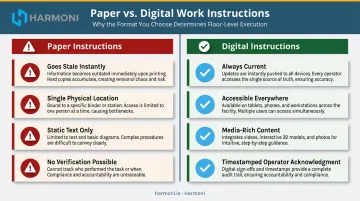
Digital work instructions eliminate each of these issues. Updates push instantly to every workcenter, media-rich content replaces text-only specs, and every operator acknowledgment becomes a traceable, timestamped event. Platforms like Harmoni take this a step further—using RFID to automatically identify the active job at a workcenter and surface the correct, current instruction without any manual lookup.
Work Instructions vs. SOPs: What's the Difference?
A Standard Operating Procedure (SOP) defines a process at a high level—the what and why of how work gets done. A work instruction specifies the exact steps, tools, settings, and sequence for completing a specific task within that process.
Both are needed. But work instructions are what operators actually use at the point of work. An SOP tells you that incoming material must be inspected; a work instruction tells the operator which gauge to use, what tolerance to check, how to record the result, and what to do if the part fails. That level of specificity is what separates a shop that catches defects at the source from one that finds them during final inspection—or worse, after delivery.
Key Benefits of Digital Work Instructions Software for Manufacturing
Error and Scrap Reduction
When operators receive the correct, current instructions for the specific job in front of them—with visual aids and mandatory checkpoints—the probability of skipping steps or misreading a spec drops significantly. A 2014 electronics assembly study found human error contributed 17.69% of product defects in that environment. When those errors trace back to unclear or incorrect documentation, better instructions are the most direct fix.
ASQ's cost-of-quality framework separates internal failure costs (scrap and rework caught before delivery) from external failure costs (warranty claims, returns). DWI software operates in the prevention category—addressing root causes before the defect exists.
Consistency Across Shifts and Sites
Process variation across shifts is one of manufacturing's most persistent quality problems. Digital work instructions enforce standardization by ensuring every operator on every shift follows the same verified procedure—not the version someone scrawled on a sticky note during the night shift handoff.
This matters most in high-mix environments where jobs change frequently and the margin for "winging it" is zero.
Capturing and Preserving Tribal Knowledge
Deloitte and the Manufacturing Institute project that manufacturers may need as many as 3.8 million additional employees from 2024–2033, with 1.9 million jobs potentially remaining unfilled if skills gaps aren't addressed. The median age of U.S. manufacturing workers is 43.9 years—meaning the tribal knowledge problem is accelerating, not stabilizing.
DWI platforms give senior operators and engineers a structured way to encode decades of process expertise into searchable, reusable instructions that survive their retirement. That knowledge becomes institutional property rather than walking out the door.
Compliance and Audit Readiness
Paper cannot provide what regulated manufacturers need: a traceable record of which instruction version was in use, who acknowledged it, and when. Key regulatory requirements that DWI software satisfies directly:
- ITAR: Covered records must be maintained for five years, with electronic logs preserving who changed what and when
- NIST SP 800-171 / CMMC: Requires audit logs and traceable user actions at the system level
- AS9100 / IATF 16949 / ISO 13485: Controlled document revision history is a foundational audit requirement
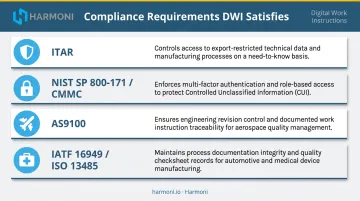
Digital work instructions create this audit trail automatically. For regulated manufacturers, the gap between a paper binder and a controlled digital record is a compliance gap—not just an operational one.
Real-Time Visibility Into Process Execution
The strongest DWI platforms don't just deliver instructions—they pull data back. Operator sign-offs, measurement entries, inspection results, and completion timestamps flow to supervisor dashboards in real time, enabling problems to be caught during production rather than at final inspection.
Harmoni, for example, captures digital checksheet data in real time so managers can detect when production cycles are trending out of tolerance before a part is scrapped—not after.
Must-Have Features in Digital Work Instructions Software
Not every DWI tool delivers the same depth. Here's what to require, not just request:
Multimedia-Rich Content Authoring
Text-only instructions leave too much to interpretation. Look for the ability to embed:
- Photos and annotated diagrams
- Step-by-step video clips
- 3D models for complex assemblies
- Callouts highlighting critical dimensions or assembly sequences
Visual aids measurably improve operator comprehension—particularly for newer operators who lack years of floor experience to fill in the gaps.
Version Control and Approval Workflows
In a controlled manufacturing environment, an instruction that isn't approved shouldn't exist on the floor. Period. Your DWI system needs:
- Draft → review → release workflow with role-based sign-offs
- Version history showing who changed what and when
- Automatic lock-out of superseded versions so operators can never access an old revision
- Traceability linking each production event to the specific instruction version in effect at that moment
ERP and MES Integration
A standalone DWI tool that doesn't know what job is actually running creates its own class of errors. Operators can receive the right instruction template for the wrong revision if the system isn't connected to current job order and routing data.
Platforms that pull job data, engineering revision, and routing directly from the ERP eliminate this mismatch. Harmoni integrates natively with Epicor, Infor, Infor Visual, ECI JobBoss/JobBoss2, ABAS, and ODOO—and ties the correct instruction to the specific job and part revision automatically via RFID job identification.
Real-Time Data Capture and Dashboards
Capturing data back from the floor is just as important as pushing instructions out. Look for platforms where operators can:
- Record measurements and inspection results directly within the instruction workflow
- Complete step sign-offs that create a timestamped record
- Flag non-conformances at the point of detection
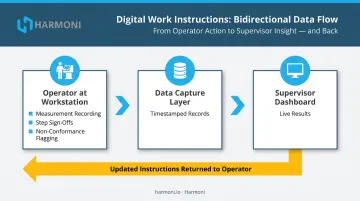
That data should feed supervisor dashboards live—not aggregate into a report at end of shift.
Mobile and Shop Floor Accessibility
Instructions need to reach operators where they work. Industrial tablets, shared floor terminals, and dedicated machine-side displays are all viable. The right choice depends on your workcenter layout and environment.
RFID-based automatic job and operator detection is a meaningful upgrade over manual login. When an operator approaches a machine and the system already knows who they are and what job is staged, the correct instruction surfaces immediately. Operators get what they need without searching or risking the wrong selection.
How Digital Work Instructions Are Used on the Shop Floor
Assembly and Process Guidance
At each workstation, operators use DWI to follow step-by-step assembly sequences, confirm tool settings, verify machine parameters, and record completion of critical steps. This replaces verbal hand-offs at shift changes and paper travelers that may or may not reflect the current revision.
The practical effect: a second-shift operator running a job for the first time follows the exact same sequence as the experienced first-shift operator who's run it 50 times.
Quality Control and Inspection
Digital checklists and in-process inspection prompts embedded within work instructions let operators capture measurements and flag non-conformances in real time—at the point of work, not at end-of-line inspection. That shift from reactive to proactive detection has a direct cost impact:
- Defects caught mid-process cost a fraction of what end-of-line scraps do
- Quality data exists for every in-process check before a part reaches final inspection
- Non-conformances get flagged while there's still time to correct them, not after
Onboarding and Cross-Training
DWI platforms double as training tools. New hires and cross-trained employees follow structured, media-rich instructions from day one, reducing dependence on a single experienced operator as the unofficial trainer for every job.
That dependence is expensive to maintain. The Manufacturing Institute reports manufacturers spent approximately $32 billion on worker training, with existing employees averaging 47.6 hours of annual training. Cutting time-to-competency with structured instructions directly reduces that training spend.
Beyond Basic Work Instructions: What Standalone Tools Often Miss
Many dedicated work instruction tools solve the documentation problem without solving the execution problem. They push instructions to operators—but supervisors still can't see in real time whether a step was completed correctly, whether the operator acknowledged it, or whether a machine parameter matched what was specified. That gap only surfaces when a part fails inspection.
This is the distinction between a tool that improves documentation and one that actually improves execution outcomes.
Factory orchestration addresses this directly. Rather than delivering instructions in isolation, a platform like Harmoni connects work instructions to machine data, ERP job data, and operator activity in a single view. A supervisor can see, in real time:
- Whether the operator acknowledged the instruction and completed each step
- Whether machine spindle data matches specified parameters
- Whether digital checksheet results are passing
- Whether the ERP job status reflects what's actually happening on the floor
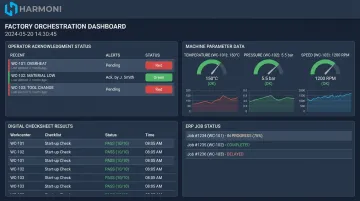
That's the difference between knowing instructions were delivered and knowing the job is running correctly right now.
For mid-to-large manufacturers in precision machining, aerospace, or defense environments, this level of integration is often the deciding factor. When work instructions operate independently of machine and ERP data, quality gaps stay invisible until a part fails inspection—at which point the cost has already landed.
How to Evaluate Digital Work Instructions Software for Your Facility
Define Scope and Integration Requirements First
Before looking at a single vendor, map out:
- Which ERP and MES systems need to connect
- Which workcenter types need coverage
- Whether your environment requires operator identification, job-specific delivery, or bidirectional data capture
- What compliance frameworks apply (AS9100, ITAR, CMMC, IATF 16949, ISO 13485)
This scoping exercise will immediately eliminate tools that can't meet your integration requirements.
Assess Ease of Content Creation
The best DWI software fails operationally if engineers won't use it to keep instructions current. Authoring tools must be:
- Fast enough that engineers don't avoid them
- Usable without specialized technical skills
- Capable of handling bulk updates when an engineering change touches multiple instructions at once
Ask vendors directly: how does your system handle an ECO that affects 20 instructions simultaneously?
Evaluate Real-World Deployment Speed
Some enterprise platforms require months of configuration before a single instruction reaches the floor. Tools designed specifically for manufacturing move much faster. Harmoni deploys in weeks — the WessDel installation was complete in under a week, with operators generating efficiency gains from day one. One machine shop customer achieved a 22% reduction in scrap within two months of going live.
When quality or compliance pressure is real, that timeline gap matters.
Check for Scalability and Multi-Site Capability
Ask vendors:
- Can instructions be centrally authored and pushed to multiple facilities?
- How does the platform handle multiple product lines and shifts?
- Can reporting aggregate from plant level to corporate level?
Platforms that handle a single shop floor well but can't scale across sites will create consolidation headaches as your operations grow.
Frequently Asked Questions
What are digital work instructions?
Digital work instructions are electronic, step-by-step process guides delivered to operators via tablets, terminals, or machine-side displays. They replace paper binders with media-rich, always-current instructions that can be tracked, version-controlled, and tied to specific jobs and engineering revisions.
What's the difference between an SOP and a work instruction?
An SOP defines a process at a high level—what needs to be done and why. A work instruction specifies the exact steps, tools, settings, and sequence for completing a specific task, making it the more granular, operator-facing document used at the point of work.
What software can create work instructions?
Options range from dedicated DWI platforms (Dozuki, VKS) and connected worker tools (Poka, SwipeGuide) to factory orchestration solutions that embed instructions within the broader production workflow. The right choice depends on whether you need instructions alone or instructions combined with execution visibility.
How do digital work instructions reduce manufacturing errors?
DWI reduces errors by ensuring operators always see the correct, current instructions for the specific job in front of them. Mandatory checkpoints, visual aids, and real-time alerts flag deviations before a defect is completed, not after.
Can digital work instructions software integrate with ERP systems?
Yes—leading platforms support ERP integration, allowing job orders, routings, and engineering revisions to flow directly into the instructions operators receive. This eliminates the mismatch between what the ERP schedules and what the floor actually executes.
How long does it take to implement digital work instructions software?
Timelines vary widely — some enterprise platforms require months of configuration, while purpose-built solutions like Harmoni deploy in weeks. Measurable operational improvements typically appear within the first production cycles.