Automated machine downtime tracking fixes this by reading signals directly from the equipment. The moment a machine stops, the system opens an event record, starts accumulating duration, and waits for a structured reason code — no operator memory required.
This guide is written for plant managers, operations leaders, and production teams in CNC machining, precision manufacturing, aerospace, and automotive environments. It covers how the process works end-to-end, what factors determine whether it actually reduces downtime (versus just recording it), and where implementations commonly go wrong.
Key Takeaways
- Automated tracking captures stop events from machine signals directly, eliminating the undercounting that manual logs produce
- Each stop event is timestamped, coded by reason, and routed automatically into production reports and maintenance workflows
- Planned and unplanned downtime must be tracked separately — they require different corrective responses
- Real-time dashboards allow supervisors to intervene during a shift, not the following morning
- Downtime data only drives improvement when it feeds Pareto analysis, root cause review, and scheduled maintenance — not just reports
What Is Automated Machine Downtime Tracking?
Automated machine downtime tracking uses hardware connections — PLCs, current-monitoring sensors, IoT edge devices — combined with software logic to detect stops, measure idle duration, and record a structured reason for each event. No operator action is required to initiate the log.
The outcome it's designed to produce: an accurate, real-time record of every production loss event, so operations and maintenance teams know exactly what is stopping output, how often, and for how long.
What It Is Not
This process gets confused with adjacent systems, so the distinctions matter:
- A CMMS records maintenance activities after the fact through work orders. It doesn't capture the upstream stop event that triggered the work order.
- A production dashboard shows output volumes and job progress. It doesn't explain why a machine was idle for 47 minutes during second shift.
- Automated downtime tracking is the event-level data capture layer that feeds both of those systems with accurate, structured information.
Without this upstream layer, CMMS records are incomplete and production dashboards are misleading.
That gap matters for measurement, too. OEE.com defines Availability as Run Time divided by Planned Production Time — where Run Time equals Planned Production Time minus Stop Time. Automated tracking is what makes that Stop Time figure accurate rather than estimated.
Why Manufacturers Use Automated Downtime Tracking
The Cost of What Goes Unrecorded
According to Deloitte, unplanned downtime costs industrial manufacturers an estimated $50 billion per year, and poor maintenance strategies can reduce productive capacity by 5% to 20%. Even within a single facility, an untracked hour of downtime per week compounds into dozens of lost production hours annually — hours that never appear in any efficiency report.
The financial impact isn't just the idle machine. It includes ripple effects on labor costs, schedule compression, overtime, and late deliveries.
The Accuracy Gap Manual Logging Creates
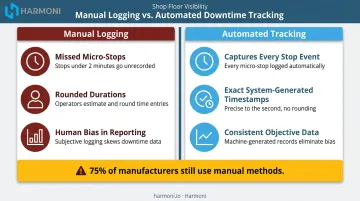
Manual logging has three structural problems that automated tracking eliminates:
- Two-minute jams that recur ten times per shift never make it into a manual log — no single occurrence feels worth documenting, yet they add up.
- Operators round durations to the nearest five or ten minutes, making MTTR calculations unreliable from the start.
- Operator errors go underreported while equipment failures get over-documented, skewing the data in both directions.
According to a Production Machining report, 75% of manufacturers still used manual data collection methods as of 2019. Plants that switch to automated tracking consistently discover their true downtime is substantially higher — often double or more — than manual records suggested.
What Automated Tracking Specifically Provides
Those accuracy problems point directly to what manual systems structurally cannot provide:
- Consistent capture across every shift, regardless of who is logging or how diligently
- Granularity down to micro-stops under two minutes — the category that erodes OEE without ever appearing in a morning report
- Structured reason codes that support Pareto analysis, rather than free-text fields that resist any meaningful aggregation
Without these three capabilities, improvement efforts focus on visible major breakdowns. The accumulated weight of small stops keeps pulling OEE down, unaddressed.
How Automated Machine Downtime Tracking Works
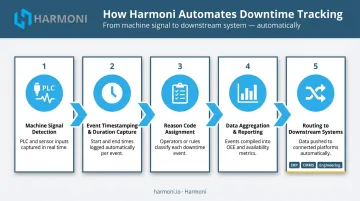
The process runs in five sequential steps, from signal detection at the machine to data routing into downstream systems. Each step builds on the last.
Step 1: Machine Signal Detection
Every downtime event begins with a real-time signal from the equipment — typically drawn from the machine's PLC, a current-monitoring sensor on the power circuit, or a proximity/cycle sensor. Software compares the incoming signal against a defined threshold to determine whether the machine has transitioned from active production to a stopped state.
Signal source matters here. Direct PLC integration provides the most granular and accurate data. Retrofit sensors (current clamps, cycle detectors) work on legacy equipment but may introduce higher latency.
Harmoni supports pre-built integrations with major CNC controller brands (Mazak/Mazatrol, Haas NGC, Fanuc 0i/30i/31i/32i, Heidenhain, Siemens/Sinumerik, DMG MORI, Makino, and Fadal), which reduces setup complexity in mixed machine environments.
One implementation note: this detection must be applied at the constraint point of the process. Improving throughput elsewhere won't increase total output if the bottleneck machine remains unmonitored.
Step 2: Event Timestamping and Duration Capture
The moment a stop is detected, the system opens a downtime event and begins accumulating duration. The timestamp is system-generated, not operator-entered — which eliminates the rounding and estimation errors common in manual logs.
This accuracy is what makes downstream analysis reliable. Calculating Mean Time to Repair (MTTR) requires precise duration data. Comparing shift performance requires consistent measurement methodology. Neither is achievable when operators are estimating times after the fact.
Step 3: Reason Code Assignment
Once the machine restarts, the operator is prompted to select a reason code from a predefined, standardized list. Examples include equipment failure, tooling changeover, material shortage, and operator unavailability.
Vorne recommends keeping this list to the smallest set that is truly actionable. Overly broad categories (e.g., "machine problem") produce data that can't drive targeted action. Overly granular lists cause operators to disengage and select random codes. The rule of thumb: if your team is spending more time capturing reasons than taking action on them, the list is too detailed.
Harmoni's factory orchestration platform adds operational context at this step by automatically associating the downtime event with the active job and operator via RFID detection. Each event carries machine ID, job context, and operator identity — not just a timestamp — which is what enables accurate job costing downstream.
Step 4: Data Aggregation and Reporting
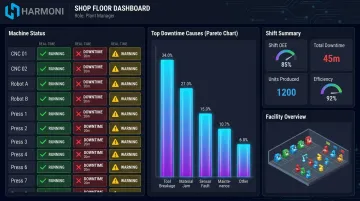
Structured event records (machine ID, stop duration, timestamp, and reason code) aggregate into dashboards and reports. Pareto charts rank causes by accumulated downtime, making the top loss categories immediately visible. Shift comparison reports surface whether patterns are consistent across time blocks or operators.
This is where real-time visibility matters most. Dashboards that update during a shift allow supervisors to intervene before the shift closes. A pattern of recurring tooling stops visible at 10 AM can trigger a maintenance response at 11 AM, rather than a postmortem analysis the following morning.
Step 5: Routing to Downstream Systems
Automated tracking delivers its full value when event data flows out of the monitoring layer into connected systems:
- Maintenance platforms receive stop events to trigger work orders or update PM schedules
- ERP systems receive availability and OEE data for accurate job costing
- Engineering teams receive failure patterns to inform process or design changes
Harmoni sits between the machine layer, ERP, and operator workflows, combining machine signals with operator activity and production job context. That's what gives each downtime event meaning beyond a simple timestamp. The WessDel case study (featured in Modern Machine Shop) puts numbers to it: before Harmoni, operators spent an average of 11 minutes per ERP transaction entering time data manually. After deployment, that process dropped to seconds, producing cleaner data and 17 productive hours gained per employee per month.
Key Factors That Affect Tracking Effectiveness
Deploying automated tracking is the easy part. Getting accurate, actionable data out of it requires getting these four factors right.
Machine Connectivity Method
Direct PLC integration delivers the most accurate and granular signal. Retrofit sensors work on legacy machines but may have higher latency. Mixed environments (a common reality in CNC job shops running Fanuc, Haas, and Mazak machines side by side) require a platform with broad native controller compatibility to achieve consistent data quality across the floor.
Reason Code Design
The quality of Pareto analysis is only as good as the reason code library feeding it. Overly broad codes make the data unactionable. Overly detailed codes cause operator disengagement. This design decision happens before deployment and determines whether collected data ever drives real improvement.
Planned vs. Unplanned Downtime Classification
High-mix, low-volume environments generate frequent changeovers and setups that must be correctly distinguished from unplanned stops. If a 45-minute SMED changeover gets classified as unplanned downtime, the Pareto chart points to the wrong problem.
Scheduled breaks, maintenance windows, and tooling setups must be configured upfront so the system classifies events correctly — misdirected data means misdirected improvement efforts.
Scale and Centralization
Tracking one machine is straightforward. Tracking 50+ machines across multiple work centers requires:
- Centralized dashboards with facility-wide visibility
- Role-based access (what an operator sees differs from what a plant manager needs)
- The ability to surface top losses across the entire floor, not just per-machine data
For multi-site manufacturers, standardized reason code libraries and shared reporting structures are necessary to make cross-plant benchmarking meaningful.
Common Misconceptions About Automated Machine Downtime Tracking
"Installing the system reduces downtime"
It doesn't. Installing a tracking system surfaces data. The data does not act on itself. Teams that deploy automated tracking without a structured review process accumulate dashboards without reducing downtime. That process needs to include:
- Weekly Pareto analysis tied to improvement ownership
- Root cause investigation on recurring stops
- Maintenance follow-through on identified failure patterns
The tracking system is a diagnostic tool. The cure requires people and process.
"Major breakdowns are the main problem"
OEE.com classifies Idling and Minor Stops as performance losses distinct from availability losses — and these micro-stops, typically lasting a minute or two, accumulate into significant production loss across a shift. Automated systems that only flag stops above a minimum threshold miss this "hidden factory" of loss entirely. World-class OEE tracking captures all availability losses, not just the ones visible to a supervisor walking the floor.
"Downtime tracking and OEE are the same thing"
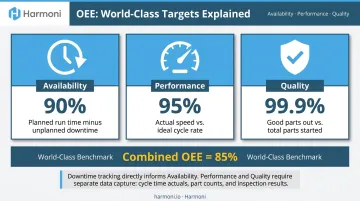
OEE has three components: Availability, Performance, and Quality. Downtime tracking primarily informs the Availability component. Performance losses — slow cycles, reduced machine speed — and Quality losses — rejects, rework — also degrade productive output and require separate data capture.
OEE.com puts world-class OEE at 85% for discrete manufacturers, built from 90% Availability, 95% Performance, and 99.9% Quality. A team that equates their downtime log with their OEE score is tracking one input — and leaving Performance and Quality losses completely unmanaged.
Conclusion
Automated machine downtime tracking converts every production stop into a structured, timestamped, categorized data record — automatically. It gives operations and maintenance teams the information they need to see what is costing production time and act on the highest-priority losses with confidence rather than guesswork.
Getting it right requires more than installing a tool. Machine connectivity must be reliable. Reason codes must be thoughtfully designed. And the resulting data must connect to action — through root cause analysis, maintenance scheduling, and structured continuous improvement reviews. The shops that get the most out of downtime data are the ones that build a consistent review cadence around it — turning structured records into scheduled action.
Harmoni's factory orchestration platform captures machine downtime automatically, categorizes it in real time, and connects that data directly to your ERP, maintenance workflows, and shop floor dashboards. If you're ready to stop estimating losses and start measuring them, request a free demo at harmoni.io/demo.
Frequently Asked Questions
What is the difference between planned and unplanned machine downtime?
Planned downtime covers scheduled events: changeovers, tooling setups, and preventive maintenance windows. Unplanned downtime is any unexpected stop caused by equipment failure, material shortages, jams, or operator error. The two require separate tracking because the responses differ — scheduling optimization for planned events versus root cause analysis and maintenance intervention for unplanned ones.
How does automated downtime tracking differ from manual logging?
Automated systems detect stops directly from machine signals at the moment they occur, capturing accurate timestamps and durations without relying on operator recall. Manual logging consistently misses short stops, introduces timing inaccuracies, and is vulnerable to human bias — producing downtime figures that significantly underrepresent actual production losses.
What data does automated machine downtime tracking collect?
Core data per event includes machine identifier, stop timestamps, stop duration, and reason code. Advanced platforms also capture operator identity, active job or part number, and shift. Harmoni links each event to ERP job context via RFID, enabling accurate labor and job costing data alongside the stop record.
How does automated downtime tracking connect to OEE?
Downtime tracking data directly informs the Availability component of OEE by recording how much planned production time was lost to stops. Accurate event-level tracking is the prerequisite for a meaningful Availability figure — without it, the number is an estimate rather than a measurement.
Can automated downtime tracking work on older machines without modern PLCs?
Yes. Legacy machines can be monitored using retrofit sensors: current clamps on the power circuit, cycle counters, or voltage sensors on pilot lights. Signal accuracy may be slightly lower than direct PLC integration, but automated capture from legacy equipment is still far more reliable than manual logging.
What is a downtime reason code and why does it matter?
A reason code is a predefined category an operator assigns to a stop event to describe its cause: equipment failure, tooling change, material shortage, or operator unavailability. Without standardized codes, stop events can't be aggregated or compared, making Pareto analysis impossible and leaving teams unable to act on the data.